Kareem Powell is a GTM Finance analyst who turns data into insights that shape decisions across Sales, Operations and Finance. He writes Walk of Grit to inspire the next generation of entrepreneurs, analysts and data scientists, whatever their background.
Revenue Variance & Modeling: Developed a Revenue Variance dashboard in Superblocks, integrating Snowflake SQL, Claude Cowork, Salesforce and Slack, to flag renewal discrepancies and resolve six figures in variance before Finance leadership review (Amplitude, 2026).
GTM Finance Documentation: Standardized GTM Finance definitions and documentation with Claude Cowork, Granola, Superblocks and Microsoft Excel, reducing new-employee onboarding time (Amplitude, 2026).
Forecasting: Publishes Revenue Whisperer revenue forecasts for ten SaaS companies and the Messi model match forecasts for Europe's top five leagues, each with a back-tested track record.
Read moreShow less
To that extent, and over the course of my professional career, I’ve documented various aspects of my life, this period included, to hopefully provide perspective, especially to those from humble roots.
Born and raised in Kingston, Jamaica (Haha, yes Jamaica 🇯🇲: “wah gwaan!”), to the streets of the San Francisco Bay, my mission in life, even before I vocalized it, has always been to inspire others to Grit, and my vision has similarly always been that people’s lives would improve by being inspired to Grit.
In my most recent experience, I worked across Sales Finance: first in Order Management from March 2026 to May 2026, then in Deal Desk for the month of June to support the June Quarter-End Close Cycle, and then quickly back in Order Management in July of 2026… where, with the knowledge I had gained in both teams, I was enabled to work cross-functionally across GTM Finance to support both up and downstream teams from Sales, to Sales Operations (RevOps), to Legal, to Deal Desk, to Order Management, to FP&A, to Commissions, etc.
Through my time working cross-functionally across GTM Finance, I was able to standardize our GTM Finance definitions and documentation using Claude Cowork, Granola, Superblocks, and Microsoft Excel, to reduce new-employee onboarding time and enable us to scale quickly with the rest of the company, so that as our revenue grew and we brought in more customers, we’d be more enabled to keep pace with the rest of the Org, which had shifted to a more AI-native approach.
But What Did An AI-Native Approach Mean For An Operations-Focused Unit?
It meant having to learn from scratch for a lot of people. Transitioning people to different technologies or tools is often a difficult process, since change is something we as a society struggle with.
But from being enabled by team members across Sales, Sales Finance, Rev Ops, Legal, Deal Desk, Order Management, FP&A, and Commissions, I was able to work cross-functionally and collaboratively across teams to learn more about the business over the roughly 7-month period — about what we did, how our products worked, and how best to provide value for the team — which is when I realized that for my department, which was really relatively new, we did not have the enablement needed to scale with the rest of the Org as we became more AI-native, and as such would not be able to handle the additional influx of deals with the tools at our disposal.
This realization eventually allowed me to receive the approval to complete and automate the documentation across both of our teams, which allowed many of our cross-functional teams to work more cohesively and to be brought into how we approach different opportunities. We now had the data we needed: we could pull deal data from Salesforce that we weren’t able to pull before, run forecasts we weren’t able to run before, and put together a treasure trove of info on things we might have missed to share with up- and downstream teams, enabling Sales, RevOps, FP&A, and the broader Sales Finance Org.
But while it may sound like I’m making it a big deal, when it was just documentation… Well, I’d say that’s because it kind of is.
Why Was It A Big Deal?
I had worked at a clean energy software startup before, where the documentation served as a key lifeline across a smaller team of executive stakeholders. As the only intern, I worked mainly with Directors, CEOs, COOs, Managers, etc. to complete it, even though the internship was slated for just 4 months. And even though I had no prior experience in the Distributed Clean Energy space, the documentation which I created, “The WattCarbon Universe”, still lives on to this day.
In just 4 months, I was able to learn and understand complex energy deals, the financial planning and analysis needed for those deals, about VPPAs, Energy Attribute Certificates (EACs) and why they’re preferable to RECs: they provide tracking that allows our Corporate Buyers to see where the EACs they purchased were being used: for example, were they earned through Solar Panels generating electricity in the most polluted times of the day, or were they saved by heat pumps which helped to heat water during the most expensive (electric) times of the day.
And even from my recent experience at the Drucker School of Management (founded by the great Peter Drucker, the Father of Modern Management), I was able to enable my team there as well by logging all our supplies for meetings, classrooms and lectures, by putting together models for project planning to forecast upcoming demand based on our current usage, and by helping us plan for capacity in other regards.
But from this experience as well, having worked with world class Professors, Faculty, and Staff, I was able to feel enabled, capable, and trained through their guidance, their support, and through their encouragement.
One of the hardest things in managing employees is enabling them and ensuring that they feel confident about their tasks, and in both of those roles, at WattCarbon and Drucker, and even at prior organizations such as Sagility, I worked cross-functionally across departments to enable and help our agents feel more capable by digesting difficult-to-understand quality assurance metrics using Excel VBA models, PowerBI, Tableau, and Microsoft Access SQL to synthesize and consolidate the reporting of metrics across our group of companies.
But that’s all to say that one of the quickest ways to scale is to ensure that teams are acting in accord by enabling them to feel capable and empowered, since they can then feel much more confident to share information, data, and to work cross-functionally across teams, so as to provide shareholders — if it’s a public company — with the most value; since a business that can scale quickly and effectively, and that can easily adapt to change, is a business I’d definitely be willing to place my bet on.
Appreciative and grateful to those who continue to invest in the next generation. Thank you for your service, your candor and kindness, and for continuing to enable us as we pursue our dreams.
I think I often try to prove my ability by taking on more work.. but that has often made it harder to prove my ability, since I now have too much to focus on
Found a few studies reinforcing. TLDR: A lack of proper sleep (6 hours or more) may result in “cognitive performance deficits equivalent to up to 2 nights of total sleep deprivation” and “a deficit in the ability to form new human memories”.
I’ve come to realize that I heavily prefer task checklists to calendaring, and those checklists need to be extremely specific… at a glance, they should have
what needs to be done
how I “plan” to do it
where to find all related info (whether links, docs, contacts, etc.)
It also helps to not plan too far ahead, since the future often changes, which can end up rendering some future tasks null and void
I've come to love a certain type of Co-op class, where you practice Career skills from the books you’ve chosen and discuss your experience and takeaways… since it’s helped make more natural this process of continuous learning while reflecting, and has helped to serve as a reminder that with enough time what isn’t known can eventually be learned
Walk of Grit’s supposed to get me a bit more consistent with this stuff. An amazing manager I once had said “If you can do it 100 times, then you know you’ve mastered it.”
Now regarded as an “Insane Talent”, the Great Lionel Messi was once viewed as a successive failure with the Argentine national team since over his career he lost major competitive tournament Finals back to back to back.
2014 FIFA World Cup Final: Argentina0–1Germany(after extra time) (July 13, 2014)
2015 Copa América Final: Argentina 0–0Chile(1–4 on penalties) (July 4, 2015)
2016 Copa América Centenario Final:Argentina0–0Chile(2–4 on penalties) (June 26, 2016)
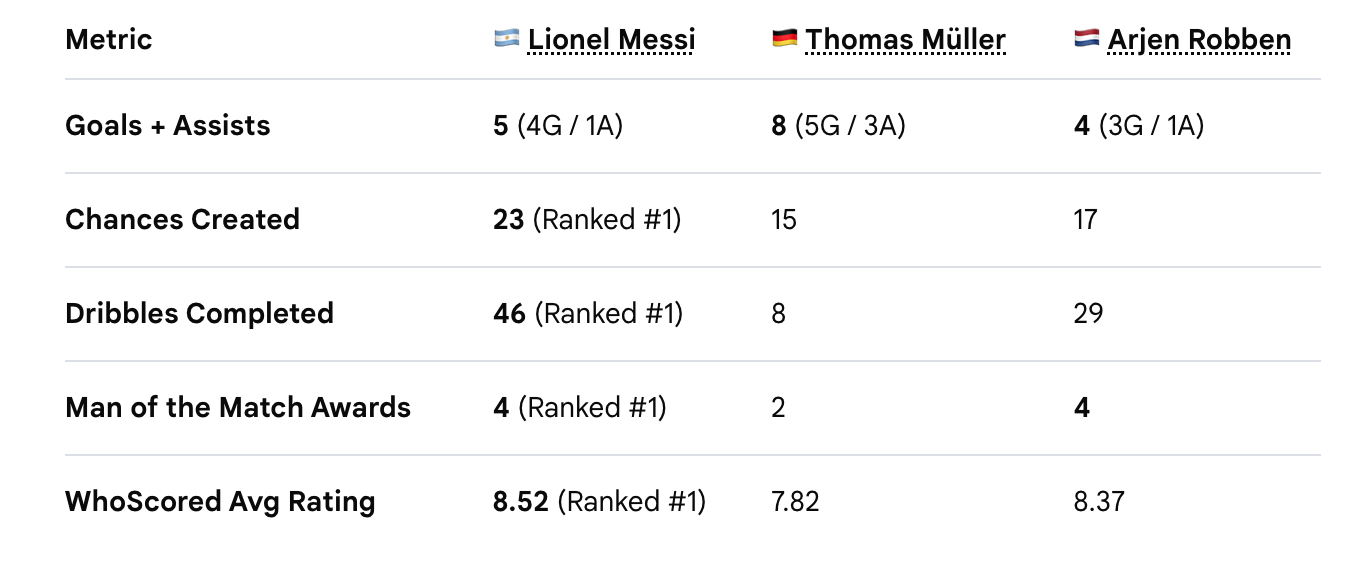
However, even though his biggest loss came in the 2014 World Cup final, he was still the tournament’s BEST PLAYER BY MILES. Here are more than a few statistics proving the same:
“Golden Ball Award: Named the official best player of the 2014 tournament for his leading role in carrying Argentina to the final.
Vital Goal Contributions: Scored 4 goals and provided 1 assist during the tournament, including crucial group-stage match-winners against Bosnia and Herzegovina, Iran, and a brace against Nigeria.
Playmaking Impact: Created the most goal-scoring chances (21) of any player in the tournament and won the Man of the Match award four times.
Deep Run: Captained Argentina to their first World Cup final in 24 years (since 1990), playing every single minute (120 minutes per match through the knockout rounds). [1, 2, 3]”
But although his individual performances were always above par, because of the backlash received from losing his first World Cup final, Messi eventually shared his decision to retire from the national team.
…which wasn’t a bad tradeoff, considering he could still go back to Spain to play for Barcelona, which was where he had made his home since immigrating as a child. Looking back, Messi did share this reflection on his feelings of disappointment which led to his retirement from the national team:
Surely, the pressure couldn’t have been that overwhelming, since a few years prior Messi dazzled the world with many magical moments, similar to in the 2011 Champions League Semi-Final against Real Madrid at the famous English Wembley Stadium:
"Here is Messi, away from two, three, four... oh, oh, oh, wonderful, wonderful, wonderful! How good is he? A mere supernatural goal from Lionel Messi! He has wriggled and tip-toed his way to the gates of Wembley. He is just brilliant—best player in the world, bar none." - Peter Drury, from the UEFA Champions League semi-final first leg match between FC Barcelona and Real Madrid (April 27, 2011)
So, What Was It Really?
The challenges that come with leadership. Since when you lead from the front, you demonstrate responsibility and accountability for the results of your team.
When your team does well, all is okay, but when they don’t do well, all seems lost.
Dealing With Adversity
But luckily, this wasn’t the first time Lionel dealt with adversity, as before he moved to Barcelona at the age of 10, he was diagnosed with a growth hormone deficiency (G.H.D.), that without treatment, would result in Messi not growing past 4 ft 7 inches and would possibly limit other physical aspects of development, such as muscle mass development and bone density.
Which might strike a chord with some —the feeling of being limited by things from one’s childhood years that, unfortunately, you had no control over.
But luckily for Messi—and some too—there are people who care, who’ll invest in your talent and work to help you reach incredible heights, which in Messi’s case allowed him to compete on the world’s biggest stages and finally secure the 2022 World Cup!
With grit on Messi’s side, from having to endure 1,460 INJECTIONS IN A ROW over 4 years (from ages 10 to 14) to aid his growth, he learned early on how to bounce back, since that resilience was developed from an early age.
But Do Soft Skills Really Matter In Football?
For me, yes. Since what has always amazed me about Messi’s time with any of his teams was that even though he cared deeply about winning, at times it seemed like he had Zero EGO. Whilst he displayed an immense fire and zeal for the game—as anyone in his position would, especially after 1,460 days of injections—his leadership and ability to inspire his teams contributed to some of the greatest, most intense, competitive football matches that the world has ever seen.
And from the reactions of his teammates after Messi won the coveted 2022 World Cup, it rightfully seems that his leadership was seen and noticed due to the outpouring of love from his team after they finally won the coveted 2022 World Cup!!
And notably, just four years after winning the 2022 World Cup, Messi completed his international career at the very top, playing his final World Cup match against Spain, while enduring the painful loss of his father (Rest in Peace, Jorge Horacio Messi, 1958 – August 8, 2026), and being named by many the tournament’s best player at the ripe young age of 39! Timeless. Truly timeless.
If there’s anything to take from Lionel’s journey, it’s that DISCIPLINE and GRIT go hand in hand, and are timeless qualities that will carry each of us to our own historic legacies, as long as we keep showing up to finish what we started.
Stop. Take a minute to smell the roses. See where you are now compared to before. Learn from your experiences. Be gentle in your mistakes. Focus on what you’ve accomplished, and what you want to accomplish, and who knows, maybe you’ll see that you’re almost there.
For Messi, just pushing a bit more, whether as a child or in his older years, resulted in the following historic list of accomplishments that puts him above all other players:
Lionel Andrés Messi | G.O.A.T Accomplishments:
Total Goals: 934 (#2 Ranking All Time)
Total Trophies: 47 (#1 Ranking All Time)
Total Titles: 47 (#1 Ranking All Time)
Total International Trophies: 6 (#2 Ranking All Time)
I've often wondered whether it's possible to assure oneself of one's future growth, irrespective of shortcomings and shortfalls.
…because, if so, then even when facing defeat, you'll be confident in your ability to bounce back no matter the situation; which for some of us is what we strive for, right?
To be so pleased with Who We Are that we can foresee a future where “Qu'est-ce qui est possible?” is something we know intuitively, having worked arduously to truly understand ourselves and our capabilities.
So Why Does That Matter?
Well, I could say for myself that one common thread over the course of my past failures was my lack of preparation in developing skills that I wasn't aware I needed to develop, with the clearest example coming from the summer of 2024, prior to joining an early-stage software startup.
Having rested on my laurels a bit, after securing an Analyst role in December of 2023, I was met with the unusual predicament of my contract being canceled due to a deal falling through. But you just might say: “But Kareem, I can definitely understand resting a bit, having already secured the role in December.”
And my response would be: yea, but that’s where I messed up. In my head, I felt a temporary relief from reaching only the Starting Line to one of my Goals, and because of that relief, I felt a false confidence, having now believed that I had actually made it to my Goal, when I had truly yet to reach the start. So I stopped trying to understand myself and my capabilities, and was left unprepared in the Summer that had now arrived, since it was now time to pivot into a completely new field: from Finance (or Mergers & Acquisitions) to B2B SaaS (in a Clean Energy Software Startup).
But from that experience, and many others to date, one thing I've learned is this: No Matter What, keep working. Even if you might need to cry for a bit, never, never stop working on your craft and building on your current skills.
But After My Internship Finished In The Summer Of 2024, That Did Leave Me With A Few Slightly Harder Questions:
“What skills should I be working on?”
“What should I focus my time on?”
“What is worth doing today to help my future self, irrespective of what I had experienced?”
I've thought about these questions a lot since then, over the past two years, and coupled with how often the world has seemed to change, whether with AI, Bitcoin, Finance or Tech, it has still often seemed confusing, really confusing, how to identify or select what should be one's “core skills”.
While thinking about those questions, I remembered some advice which I found helpful. That being to define my vision — which is how I'd want the world to look as a result of my impact — and to define my mission — which is what actions I'd take to make my vision a reality.
But Why Was That Particularly Helpful In Knowing How To Move Forward?
Because it helped to narrow my focus a lot.
My mission was to inspire others to Grit, by continuing to show up even when life was at its most challenging, while relying on mentorship, curiosity and candor. And my vision was that people's lives would improve from being inspired to Grit. So it became easier to figure out what to focus on to make that vision a reality, by developing the skills needed to get there. Some of which included:
(a) Thinking critically, which I developed through writing: I learned to organize my thoughts better by writing a Blog post EVERY DAY for almost one whole year, from the Summer of 2024 to the Summer of 2025.
(b) Grit, which was learned by making mistakes, but while still being self-critical and self-aware enough to learn from those mistakes, and improve on them.
(c) Coding in Python, which was mastered by completing passion projects in the Summer of 2025; most of which you can find here at The Field Blog.
Developing those skills over the last two years eventually gave me the confidence that I’d be able to bounce back from any situation… especially after seeing how quickly I learn new things.
More recently, and especially since entering the AI world, it has often felt unclear what to focus on… But we don’t need to feel afraid, since choosing our path, and how we traverse it, along with the skills needed to become successful, can give us the comfort in knowing that we'll stand out as we continue to enhance and build on our skills.
Kareem Powell #WalkOfGrit
You could say Chapter One is a reminder to myself of what truly matters when trying to accomplish something new. So my hope is that if you've read this far, you've gotten something from reading it too.
The CFA Research Challenge: Predictions, Predictions!
Earlier this year, I did this "competition thing" with a few MBA friends, where we tried to analyze and price a randomly selected company. We did pretty well and came in second place! But I thought it would still be fun to ask, three months later… how has our analysis held up?
Our January 30th recommendation for PennyMac Financial Services (PFSI) was a Moderate Buy with a one-year target price of $113.55 — a 12.18% upside to its December 31, 2024 price of $102.25. Interestingly enough, PFSI reached its 2025 year-high of $114.82 the day of our recommendation — however dropping back to $104.38 the day after, following the release of its 2024 earnings report. PFSI's price has remained fairly stable since then until Thursday, April 3rd's Liberation Day — when most U.S. stock prices fell. The following week, PFSI dropped to its 2025 year-low of $89.28. However, since then, the stock crawled its way back to $99.28, as of yesterday, Tuesday, May 13.
Now this large drop in price we had mostly anticipated, although to a lesser extent — as you will see from our experience competing at this year's Los Angeles CFA Research Challenge.
What's The Challenge About?
Before we jump in, what was the CFA Research Challenge about? From the challenge's website:
"The CFA Research Challenge provides students with in-depth exposure to the U.S. stock market. Challenge participants work as equity analysts to value a company’s stock creating a 21-page report and 50+ slide presentation, and then defending their recommendation to a panel of CFA Charterholders."
For the 2024–2025 competition, we analyzed the residential mortgage finance company, PennyMac Financial Services (PFSI). PFSI was founded shortly after the 2008 financial crisis, in which over 10 million people ended up losing their homes. Leading up to the crisis, in an effort to juice their earnings, banks provided mortgage loans irrespective of people's credit history. When interest rates increased and monthly payments went up, many people couldn't afford their payments, causing a massive wave of defaults.
After this balloon of mortgage loans popped, PFSI then swooped in to stop the bleeding. By purchasing some of these failed mortgage loans and providing affordable repayment plans, some homeowners were able to not foreclose. In addition to affordable loan servicing, PFSI also provided mortgage loans, and created its subsidiary PennyMac Mortgage Trust (PMT) to invest in real-estate financial assets.
Where Did We Start?
We began with familiarizing ourselves with the company’s operations by reading through previous Form 10-Ks and 10-Qs — combined 100+ page documents with information on company financials, services, risks, etc.
We then looked at PFSI's three major lines of business (LOBs) — loan production, loan servicing, and investment management — noting early on the effects on earnings of internal and external events. For example, in the declining Fed rate environments of 2022 to 2024, PFSI originated significantly more mortgage loans than in previous years — as resulting deflation meant that people had "more income" to spend on things such as homes.
With loan origination being the company’s largest source of income, PFSI saw record growth of 81% over these two years! From $56.66 in December 2022 to $102.35 in December 2024.
While on the opposite end, servicing and investment management performed better during periods of rising interest rates due to higher mortgage payments and interest payments respectively.
This example of the complex effects of external events on PFSI's earnings highlights the difficulties we faced in our analysis. However, we seemed to have pulled it off nonetheless! Why was this the case? Well, mainly one thing:
Our Valuation Reflected Economic Reality — Not Our Hopes Or Dreams
When creating our valuation, and modeling the effects of internal and external events, we ensured that our models reflected current realities and not what we wanted or hoped would happen. Given the record-breaking market performance of 2024 and the resulting low interest rate environment, it wouldn’t have been difficult to assume that the same would be the case for 2025 — which is exactly what we thought, at first.
However, discussing with my mentor the reasoning behind our valuation led me to realize that my thought process was driven by optimistic beliefs. Thinking about the 2025 market, it just did not line up that budgetary cuts, tariffs, and de-regulation would contribute to a continued low inflation environment. Higher inflation would eventually result in higher rates of interest which would then lead to a lower demand for mortgages. As, if it became difficult for people to afford basic goods such as eggs, mortgages would no longer be as attractive as before.
But despite our methodical, well-thought out approach, we seemed to have just missed out on the coveted first place. Why was this the case?
Well, simply put, we considered almost every major possibility, missing out on a few important market developments; one of which included: the possible privatization of Freddie Mac and Fannie Mae.
Why Would This Have Been Significant?
Fannie Mae and Freddie Mac were two of the largest publicly traded mortgage companies that provided mortgage guarantees that reduced the risk of loans, leading up to the 2008 financial crisis. But in 2008, with massive mortgage loan defaults, both companies had to be bailed out by the U.S. government for an amount close to $200 billion. They were then placed under government control — otherwise referred to as conservatorship — which meant that the government would collect their revenues, until their debt was paid off.
There have recently been calls to return both companies to the public, as both companies seemed to have repaid their debt in full. So, what would have been the relevance in our analysis of the mortgage industry? Well, without continued government guarantees, there would be a higher risk of defaults which would inevitably lead to higher mortgage rates — thus decreasing the demand for mortgages.
Additionally, since PFSI purchases its loans from Freddie Mac, privatization would also mean higher costs of purchasing, as it can be reasonably argued that a non-government company would inevitably charge more to maximize earnings for its shareholders.
The Takeaway?
We placed second in the CFA Research Challenge because we nailed the real-world drivers behind PFSI’s stock price. But if we had gone one step further, leaving no stone unturned, we just might’ve taken first!
Ever heard of the business Powell Shipping? Probably not, and that’s fair. It was my first start-up, and we were just a team of two, operating two years prior to when I relocated to the U.S. Our parcel courier service offered e-commerce shipping from our U.S. warehouse delivered directly to our customers in Jamaica.
We bootstrapped the company using personal savings, attracting nearly 50 customers in our first month. I built an automated custom shipping database using Google Sheets and Google Apps Script, that generated user IDs, sent welcome emails, and provided customers with status updates.
Designing the system took two weeks; debugging it? Another week. But once it worked, it simplified most of our operations process. Still, simplicity doesn’t equal scalability.
We knew we could grow, but didn’t know how to scale. So looking back, what might have helped? You guessed it: data!
The Power of Data
“Even a small key can open a large door.” – Charles Dickens
Leveraging data more intentionally would have opened doors we didn’t even know were there.
Solid market insights could have helped identify high cashflow opportunities to maximize our revenue and eventually secure potential funding. Many start-ups did just that after the 2007 financial crisis—using data to spot opportunities to scale, moving faster than the competition to establish early market dominance. Perhaps we could have done that too!
A Playbook from N26
Consider N26, the German fintech startup founded in 2013 which spotted what traditional banks overlooked—data showing customers shifting away from physical branches in favor of the digital banking experience.
Responding quickly, N26 seized the opportunity, offering a superior digital experience to traditional banking customers. Starting from their $2 million seed round, N26 now serves close to 8 million customers, with a valuation over $8 billion USD.
Which makes me wonder—how far could Powell Shipping have gone, acting on similar data-driven insights?
The Relaunch
Let’s say Powell Shipping relaunched today using a data-driven approach. The first challenge we'd encounter is finding relevant Jamaican parcel courier market data. I have only found one data point thus far: a rumored (2020) $53.5 million USD market valuation.
However, the broader logistics market offers more accessible data and greater opportunities. The global logistics market is valued at $10 trillion USD and is projected to exceed $15 trillion USD by 2027, while Jamaica's logistics sector—currently valued at $200 million USD—displays similar growth potential.
Pivoting into the larger logistics market will — however — be more challenging, requiring significant upfront capital investments—additional office and warehousing space, shipping containers, vehicles, and more. To successfully enter this industry, I'd need more than just a few Google Apps Scripts!
Would The Return Justify The Investment?
We’ve all heard the statistic: "90% of startups fail in their first year." In reality, this figure is closer to 35%— but still the risk is real.
Here’s where the opportunity lies: Jamaica's logistics industry is riddled with pain points, including high costs and bottleneck delays. Retailers, healthcare providers, and manufacturers are just a few of the industries that rely on logistics—and they are all eager for better solutions.
With faster, cheaper, and more reliable deliveries, Powell Shipping could disrupt the market. We might even re-engage our prior customers with affiliated business or partner discounts, creating a small but strong referral pipeline to expand our rebranding.
So no—maybe we didn’t scale Powell Shipping back then.
But now, with the right data and insights, we wouldn’t just grow—we’d eat the market alive.
Graphic: Canva.com
U.S. College Hunger Games: The International Student Experience!
“We’re excited to share that you’ve been awarded a scholarship to study a Master’s in Financial Engineering in Los Angeles, California!”
Wow, great! But also—yikes. I was thrilled but it also felt extremely sudden. I had just applied in January of 2022, and now, in just six months, I’d be packing up to leave home. My head spun with a thousand questions: Was I ready for the move? What were my next steps? How should I prepare?
Up till then, my perception of the international student experience in the U.S. closely resembled that of a real-life Hunger Games: where students from different "districts" competed for limited opportunities.
Would reality live up to that expectation?
The U.S. College Experience
My journey as an international student started long before I set foot in the U.S.
Leading up to my departure, I reached out to international students and alumni to hear about their experiences moving, studying, and tackling the U.S. job market.
In August 2022, I left home — traveling from Jamaica to California — ready to start classes.
Settling in was actually easier than expected—a few Amazon orders and I was good to go. Classes kicked off, and to my surprise, studying abroad felt relatively easier, compared with back home. Courses like Corporate Finance and Introduction to Risk Management focused less on theories and more on real-world applications.
In Risk Management, for instance, we built real-time risk assessment models, analyzing companies' financials using 10-Qs and 10-Ks. Corporate valuations were no longer abstract theories—as we applied learned methods to local companies.
Another key difference was the emphasis placed by lecturers on being familiar with global financial markets: “What’s the current price of the Dow Jones Index?” Ms Porter often asked.
Back home, academic success was king! As the better your grades, the better your job prospects. But here, things were different, and conversations with alumni seemed to echo the same:
“In grad school grades don't really matter. What matters is how you apply what you learn.”
But that wasn’t completely true for international students. For us, grades did matter. Failing a course meant retaking it—which was expensive. And poor academic performance could cost you your scholarship—which was even more expensive!
So, it became clear: I would have to be exceptional both in-and-outside of the classroom. Good grades would not be enough to land me the job, unless I attended an Ivy of course! Well, actually—maybe not?
Part of being exceptional outside of the classroom meant networking with professionals in the finance industry—which, as I would quickly learn, would be one of the most important factors to breaking into the U.S. market. From a September 2022 conversation with a Quantitative Researcher:
Me: “Hi, Mr. So-and-So. I saw that you were a former international student and was wondering if you had any advice for someone starting their career in the U.S.?”
Mr. So-and-So: “Hi Kareem, thanks for reaching out. I'd recommend working on stuff you're interested in and showcasing them in a portfolio.”
Advice from a startup founder, Mr. RV, echoed the same:
“Choose a thing, work hard at it. Follow that effort!”
Simple advice, but not easy to digest.
One, it sounded like more work. Two, it implied that my — $90,000 — degree would not be enough to get me "the job."
What I didn't realize then was that the cost of my degree was merely the price of admission—the cost to get through the door.
Eventually, the message became clear: Applied skills stood out more than theoretical knowledge and projects completed in "fields" of interest could help me stand out in a crowded job market.
The U.S. Job Market
Each year, about 250,000 international students graduate in the U.S., and are eligible to work for one or three years. Three years for degrees in STEM (science, technology, engineering or math) and one year otherwise.
To keep working beyond that period, a company would then need to apply for the international graduate's U.S. work (H-1B) visa—which not all companies do. And here's the reality: only 80,000 H-1B visas are issued each year, through a “random” selection lottery process. Out of 250,000 graduating students, only 32% can work for more than one or three years!
32%! The Hunger Games, indeed.
With the odds clearly not in my favor, I knew I would have to stand out. Following the advice I had gathered, I created a portfolio, worked on projects, and networked relentlessly.
By December 2023—five months before graduation—I had secured a role at a mergers & acquisitions firm.
But then came a twist I never saw coming: my offer was rescinded just a month before graduation because of a “deal gone awry.” Yes, I know, "a deal gone awry."
And just like that, I was back to square one.
Well, actually... not quite. The work I had put in outside the classroom seemed to have paid off.
I landed a four-month internship at a clean-energy software startup a week after my previous offer fell apart!
Working At A Startup
I had always dreamed of working at a startup.
But I have to admit, it was one of the most challenging experiences I've encountered thus far—yet, I loved every single minute of it.
From day one, I was entrusted with full ownership of my deliverables. No hand-holding. No roadmaps. If something needed to be done I had to figure out the what, why, and how. And to make things even harder, I worked in an industry I knew little about.
“How do you price an Energy Attribute Certificate (EAC)?”
“How do you calculate EACs generated from solar panel (or heat pump) distributed energy resources?”
I had no clue.
The learning curve was brutal. I worked 15-hour days and most weekends just to keep up. Eventually, I found my rhythm, working with an incredible team of former startup founders, product and operation managers, and even one of the very first Reddit engineers. Surrounded by brilliance, I absorbed everything I could.
By the end of the internship, I was a completely different person—my imposter syndrome had faded seeing tangible proof of my contributions.
The Big Question: Was It Worth It?
So, was the $90,000 cost of entry worth it?
For me? Absolutely.
The degree opened the door, but it was my experiences outside the classroom that gave me the confidence and competence to thrive.
Sure, the journey felt like The Hunger Games at times, but in the end, I walked away with something invaluable: an unshakeable belief that I could now succeed anywhere in the world.
Who made the first apple pie? Where did it originate? Honestly, I have no clue! But you know who might? Lauren Cabral from BackThenHistory. Here’s what she has to say:
“Like apples, apple pie isn’t as American as you might think. It actually originated in Europe, influenced by multiple culinary traditions, including British, French, Dutch, and Ottoman cuisines.”
An anonymous Due South writer adds: “The earliest recorded apple pie recipe dates back to 1381 in a cookbook called The Forme of Cury, compiled by King Richard II’s master cooks.”
So, apple pie was first documented in a royal cookbook? Makes sense! Back then, rich and extravagant flavors were reserved for the elite. But does it really matter where apple pie came from? What truly matters is that this sweet and savory dish—apples blended with sugar, flour, and other ingredients—has become one of the world’s most beloved treats.
Where to Begin?
To create our version of this classic treat—once exclusive to the elite but now mastered by a select few—we’ll blend financial apple instruments, sugar-like correlations, and statistical flour packages. Then, we’ll mix these ingredients in our integrated development environment (IDE) bowl and bake them using our application programming interface (API) oven, hoping to serve up some profitable results in the markets.
As newcomers to the business, we first need the right setup. Our tools of choice? PyCharm as our IDE bowl and Interactive Brokers’ Web API as our API oven. (For context, an IDE is where we write and run code, while an API connects us to live financial data from our brokerage account.)
The Challenge: Competing in the Market
Pie markets, like financial markets, are volatile. There are countless pies and even more pie makers, making it tough to stand out. Powell’s Pies will be competing with seasoned players who dominate the industry—J Pie Morgan, MorgPie Stanley, and GoldPie Stacks.
But what if Powell’s Pies received a $100,000 investment? Could we compete then? Maybe. Let’s consider how another pie business, Samy’s Pies, thrives.
A Strategic Approach: Lessons from Samy’s Pies
Samy’s Pies sells year-round but sees peak revenue during the holidays. By offering seasonal specialties—apple peach pies in spring and green apple pies for St. Patrick’s Day—Samy capitalizes on untapped market segments.
Algorithmic trading follows a similar logic. Competing with financial giants requires a unique strategy, much like running a new pie shop—leveraging available capital to exploit overlooked opportunities. Sounds like Business 101!
Finding Profit in Market Movements
Matt Levine’s Bloomberg newsletter, The SEC Was Busy Last Week, explains a simple trading strategy:
1. Most investors hold 60/40 portfolios—60% stocks, 40% bonds.
2. If stocks rise 2% and bonds fall 2%, the portfolio shifts to 61/39.
3. To rebalance, investors must sell stocks and buy bonds.
4. This buying and selling impacts market prices, creating an opportunity to profit.
A clever approach to pie sales follows the same principle—sell directly to pie companies that struggle to meet demand at certain times. Ethical? Maybe. Profitable? Definitely.
The Dark Side of Sweetening the Pot
Levine also discusses the SEC’s enforcement case against Two Sigma, a quantitative hedge fund. Two Sigma researchers allegedly manipulated their firm’s algorithmic trading model, prioritizing their own signals to boost performance and increase their personal payouts.
Hedge funds rely on trading signals—ingredients that enhance their strategy. These signals feed into an IDE, guiding investment decisions based on factors like market trends or even political events, such as a Trump tweet affecting the U.S. dollar.
In Two Sigma’s case, researchers manipulated correlation—a measure of how assets move together—to artificially boost returns. Their actions led to a $400 million gain for some funds but a $165 million loss for others. While the firm netted a $235 million profit, the deception harmed investors in the underperforming fund. As a result, Two Sigma paid $165 million in restitution and an additional $90 million to the SEC, bringing their total penalty to $255 million. That’s a costly lesson in ethics.
The Key Takeaway: Balancing Ingredients for Success
In trading, as in baking, too much correlation (or sugar) can be harmful. Manipulating data to obscure true risk is even worse. If Powell’s Pies advertised a specific sugar content but secretly overloaded its recipes, regulatory bodies—let’s call them the PIE-SEC—would step in.
This example highlights a crucial principle: The weighting of our algorithmic trading ingredients matters. A well-structured portfolio with low correlation among assets leads to optimal risk-adjusted returns.
In our next post, we’ll explore how to achieve this ideal balance. Until then, let’s keep our pies—and our trades—both sweet and sound!
America has some of the most advanced medical technology in the world—yet its healthcare system is notoriously expensive, inefficient, and inaccessible. Every year, millions of Americans struggle to afford basic care, while hospitals and providers battle skyrocketing costs. Sure, cutting-edge treatments and high-tech interventions improve patient outcomes, but at what cost? And more importantly, who gets left behind?
Rising medical costs are fueled not just by inflation, but by expensive technology, costly medications, and growing provider wages. [1] Without serious innovation, the U.S. will continue to fall behind peer nations in life expectancy and overall health outcomes.[2]
So, what’s the solution? Smarter technology, not just more expensive technology. By leveraging tools like telehealth services and Care Operating Systems, we can save lives, reduce costs, and make high-quality healthcare accessible to more people.
In this post, we’ll dive into real-world examples of how health technology is cutting costs without cutting care—and why the future of healthcare depends on getting this balance right. Let’s explore what’s working, what’s next, and how these innovations can reshape American healthcare for the better.
A Brief History of Health Technology
One of the earliest health technologies, the Electronic Health Record (EHR), was first implemented at the Mayo Clinic in Rochester, Minnesota, in the 1960s. However, due to its high costs, widespread adoption was limited and required government collaboration. [3] It wasn’t until 2004 that the U.S. made a concerted push toward digital healthcare records. President George W. Bush appointed Dr. David Brailer, MD, PhD, as the nation’s first National Health Information Technology Coordinator, with the goal of achieving widespread interoperability of EHR systems by 2014. [4]
By 2013, under Dr. Brailer’s leadership, 40% of non-federal acute care hospitals and one-third of office-based physicians had adopted EHR systems. This success laid the foundation for further advancements in digital healthcare, including telehealth services, remote patient monitoring, and medical billing software. [5]
Over time, these innovations have not only improved patient care but also increased operational efficiencies, reducing overall healthcare costs while enhancing access to quality services. Numerous studies have explored the financial and clinical benefits of these technologies in hospitals, urgent care clinics, and other healthcare facilities.
What the Research Says: Telehealth Saves Lives and Reduces Costs
A 2016 study titled “Cost-Benefit Analysis of Telehealth in Pre-Hospital Care” evaluated the impact of the ETHAN telehealth system, which triages eligible patients who do not require emergency department transport. The study found that this system saved $928,113 annually for patients and providers in Houston, Texas. Using the study’s cost-saving formula, I developed a Telehealth Cost Savings Model to estimate the potential financial benefits at the state level. The results indicated that telehealth programs could reduce state healthcare expenditures by up to 16.22% annually, with states like Maine and Nevada experiencing savings of over 10%.
Similarly, a 2023 study, “Costs and Cardiovascular Benefits of a Fourth-Generation Synchronous Telehealth Program on Mortality and Cardiovascular Outcomes”, examined the impact of telehealth on patients with Atrial Fibrillation (AF)—a heart condition that causes irregular, rapid heartbeats. Patients in an advanced telehealth program had their biometric data monitored by nurses and on-call cardiologists 24/7. The results showed reduced mortality rates and lower stroke risk at a comparable cost to traditional care. [6]
These studies highlight the significant potential of telehealth systems to improve patient outcomes while reducing healthcare spending.
Recent Innovations: Care Operating Systems Enhance Efficiency and Patient Care
Inspired by operational advancements in manufacturing, nuclear energy, and commercial aviation, Care Operating Systems have emerged as a way to streamline provider workflows and enhance care delivery. These systems use clinician feedback to develop automated, structured workflows, reducing administrative burdens and allowing providers to focus on patient care. [7]
For example, Jefferson Health’s Abington Hospital (Pennsylvania) implemented the OnPoint Care Operating System to reduce safety incidents and improve patient engagement. Similarly, Prisma Health (South Carolina) and the Greater Baltimore Medical Center (Maryland) have adopted Care Operating Systems to enhance efficiency and lower costs. By reducing operational inefficiencies, these systems help lower provider expenses, enhance patient experiences, and ultimately improve healthcare delivery. [8]
Challenges and Considerations for Widespread Adoption
While health technologies offer substantial benefits, they also come with challenges:
High Implementation Costs: Many healthcare facilities struggle to afford the upfront investment in these systems.
Data Security Concerns: The risk of cyberattacks and breaches of sensitive patient data remains a significant issue.
System Reliability Issues: Malfunctions or software failures could lead to misdiagnoses or incorrect treatments. [9]
Addressing these challenges requires improving the implementation process, conducting more studies on financial and patient benefits, and securing additional funding to support technological adoption.
Final Thoughts: Investing in Smarter Healthcare Solutions
While medical technology innovations often drive up costs, other technologies can reduce operational overhead and improve care quality while maintaining or lowering overall expenditures. By investing in cost-effective solutions like telehealth and Care Operating Systems, the healthcare industry can expand access, improve patient outcomes, and reduce financial burdens on both providers and patients.
These innovations have the potential to revolutionize U.S. healthcare, making high-quality care accessible to those who need it most. Now is the time to prioritize scalable, efficient solutions that enhance care without inflating costs.
We’ve all faced tough times. Many factors contribute, both external (war, economic instability, environmental disasters) and internal (mental, emotional and physical health challenges). Challenging times make it hard to succeed, and experiencing failure only exacerbates the problem. Resulting negative emotions may lead to procrastination—resulting in drops in productivity, which only contribute to future stress. [1]
Difficult times, failure and resulting negative emotions may cause us to fall behind in achieving success in our professional or personal goals.
Some of us may bounce back fairly quickly, but others, not so much. This post is for the latter: people who struggle to move forward, especially when navigating difficult times.
“Positive Override It”
Billy Oppenheimer speaks of legendary filmmaker and director Quentin Tarantino’s experience with disappointment:
Tarantino goes on to say “I was under the impression that we were making this really amazing thing”, “It was my dream project…And it ended up being nothing. Absolutely nothing!”
After brooding for a few weeks Tarantino rewatched his film, noticing the final scenes showed noticeable improvements.
When speaking of his previous failures, Tarantino mentions realizing he could “positive override” his initial reactions, resulting in two things:
Tarantino could transform feelings of disappointment into a positive outlook—allowing him to recognize areas of improvement.
Tarantino learned to view failures as learning opportunities—in this case, how not to make a movie. [2]
Learning from his failure, Tarantino would go on to produce record-breaking films, including the widely acclaimed Pulp Fiction and Reservoir Dogs. Over the course of his career, receiving 171 wins and 284 nominations in movie awards across the globe, Tarantino is now renowned as one of the greatest directors and screenwriters of modern times.
Psychologist, Dr. John Gottman, coined the term, “Positive Sentiment Override”, describing couples’ reactions to their partners when experiencing adversity. From his study:
Couples who focused on positive interpretations of partners' actions were found to have healthier relationships. [3]
While couples in distressed relationships were found to have negative perceptions of partners' actions. [4]
Applied to oneself, “positive [sentiment] overriding” one’s reactions can help in navigating difficult times. Negative emotions can result in feeling hopeless, making it difficult to continue working towards our goals. “Positive overriding” our initial reactions can help us recognize our strengths and identify the next step towards achieving our goals.
Recognizing that we are in a negative headspace is one of the first steps to “positive [sentiment] override”.
When experiencing negative emotions in difficult times, it may help to ask [some of] the following questions:
What strengths did I display?
What was I most proud of?
What did I learn not to do for the next time?
How would/could I do it differently?
Not shying away in difficult times (while continuing to make progress) combats negative emotions and inspires us to believe in ourselves. Eventually, successfully navigating troubling times then becomes a matter of patience and consistency.
As we trust ourselves more, (seeing that we’re able to turn adverse situations into opportunities for success) we end up procrastinating less as we become more excited and less scared of what the future might hold.
“Positive override” can help us make steady improvements towards achieving our future goals—not by being overly optimistic, but by facing difficult situations with a positive and opportunistic mindset. Rather than continuing to be hard on yourself for failing, experience the feelings of disappointment and challenge yourself, to notice the strengths you currently possess. “Positive override” your initial reactions in times of disappointment, to efficiently and effectively move towards your goals.
Write the clauses in this order: choose the columns, name the table, filter the rows, group them, filter the groups, then sort.
SELECT column_name1, column_name2
FROM table_name
WHERE condition
GROUP BY column_name1
HAVING condition
ORDER BY column_name1;
CTE
Names the active users and the large orders first, then joins them so each email sits next to that user’s total.
WITH clear_target_customers AS (
    -- Step 1: Get active users
    SELECT user_id, email
    FROM users
    WHERE status = 'active'
),
high_value_orders AS (
    -- Step 2: Get large purchases
    SELECT user_id, SUM(amount) as total_spent
    FROM orders
    GROUP BY user_id
    HAVING SUM(amount) > 1000
)
-- Step 3: Join the two results
SELECT c.email, o.total_spent
FROM clear_target_customers c
JOIN high_value_orders o ON c.user_id = o.user_id;
> (Greater Than): Filters for values strictly above a cutoff.
WHERE amount > 1000
< (Less Than): Filters for values strictly below a cutoff.
WHERE amount < 50
>= (Greater Than or Equal To): Filters for inclusive lower limits.
WHERE amount >= 1000
<= (Less Than or Equal To): Filters for inclusive upper limits.
WHERE amount <= 50
In the pipeline
These are the staging models from the Data pipeline tab. Names the Stripe total, then selects, joins, filters, groups, and sorts Salesforce accounts.
WITH billed AS (
    SELECT CAST(customer_id AS text) AS customer_id,
           SUM(amount_usd) AS billed
    FROM stg_stripe__charges
    WHERE status = 'succeeded'
    GROUP BY CAST(customer_id AS text)
)
SELECT a.lead_source, SUM(b.billed) AS billed
FROM stg_salesforce__accounts a
JOIN billed b ON b.customer_id = CAST(a.customer_id AS text)
WHERE a.lead_source IS NOT NULL
GROUP BY a.lead_source
HAVING SUM(b.billed) > 0
ORDER BY billed DESC;
Common Table Expressions
A Common Table Expression (CTE) is a named result set defined with WITH. A SELECT, INSERT, UPDATE, or DELETE in that statement can reference it. It lasts for that statement.
Standard / Single CTEs
One WITH query, referenced by the main statement.
Example (Find departments with high average salaries):
WITH DeptAvgSalary AS (
    SELECT department, AVG(salary) AS avg_sal
    FROM employees
    GROUP BY department
)
SELECT department, avg_sal
FROM DeptAvgSalary
WHERE avg_sal > 80000;
Multiple Independent CTEs
You can define more than one CTE in a single query by separating them with a comma. This allows you to prepare different subsets of data before combining them in your final statement.
Example (Combine top-performing employees and top-performing departments):
WITH HighEarners AS (
    SELECT employee_id, name, salary
    FROM employees
    WHERE salary > 120000
),
TopDepts AS (
    SELECT department
    FROM sales_goals
    WHERE status = 'Exceeded'
)
SELECT e.name, e.salary
FROM HighEarners e
JOIN employees emp ON e.employee_id = emp.employee_id
WHERE emp.department IN (SELECT department FROM TopDepts);
Multiple Dependent (Chained) CTEs
Multiple CTEs can also reference one another sequentially. This lets you build a linear pipeline where each step refines or expands on the virtual table created just before it.
Example (Calculate total department spend and then find the overall average of those totals):
WITH DeptTotals AS (
    SELECT department, SUM(salary) AS total_spend
    FROM employees
    GROUP BY department
),
AverageDeptSpend AS (
    SELECT AVG(total_spend) AS global_dept_avg
    FROM DeptTotals
)
SELECT department, total_spend
FROM DeptTotals
WHERE total_spend > (SELECT global_dept_avg FROM AverageDeptSpend);
Recursive CTEs
A CTE that references itself. An anchor member and a recursive member are combined with UNION ALL.
Example (Generate an organizational hierarchy level from top-level managers down to subordinates):
WITH RECURSIVE OrgChart AS (
    -- Anchor Member: Find the CEO / Top Manager
    SELECT employee_id, name, manager_id, 1 AS org_level
    FROM employees
    WHERE manager_id IS NULL

    UNION ALL

    -- Recursive Member: Join employees back to the chart to find subordinates
    SELECT e.employee_id, e.name, e.manager_id, o.org_level + 1
    FROM employees e
    JOIN OrgChart o ON e.manager_id = o.employee_id
)
SELECT * FROM OrgChart ORDER BY org_level, name;
Data Modification CTEs (Writable CTEs)
Supported by databases like PostgreSQL, these CTEs perform an INSERT, UPDATE, or DELETE combined with a RETURNING clause. This allows you to modify rows in one table and immediately use those exact modified records in the main query logic.
Example (Move deactivated users to an archive table in a single query step):
WITH MovedUsers AS (
    DELETE FROM users
    WHERE last_login < '2024-01-01'
    RETURNING user_id, email, date_joined
)
INSERT INTO archived_users (user_id, email, archived_at)
SELECT user_id, email, NOW()
FROM MovedUsers;
Multiple datasets
These are the staging models from the Data pipeline tab. Names Salesforce, Stripe, and users, then keeps ids present in all three.
WITH salesforce AS (
    SELECT CAST(customer_id AS text) AS customer_id
    FROM stg_salesforce__accounts
),
stripe AS (
    SELECT CAST(customer_id AS text) AS customer_id
    FROM stg_stripe__charges
    WHERE status = 'succeeded'
),
app_users AS (
    SELECT CAST(id AS text) AS customer_id
    FROM users
)
SELECT s.customer_id
FROM salesforce s
JOIN stripe c ON s.customer_id = c.customer_id
JOIN app_users u ON s.customer_id = u.customer_id;
Subquery Conditions (Cross-Table Checks)
EXISTS (...): True if a subquery returns at least one row.
WHERE EXISTS (SELECT 1 FROM orders o WHERE o.user_id = u.user_id)
NOT EXISTS (...): True if a subquery returns zero rows.
WHERE NOT EXISTS (SELECT 1 FROM orders o WHERE o.user_id = u.user_id)
ANY (...) or SOME (...): True if a comparison matches at least one item in a list.
WHERE amount > ANY (SELECT amount FROM refunds)
ALL (...): True only if a comparison matches every single item in a list.
WHERE amount > ALL (SELECT amount FROM refunds)
Multiple datasets
These are the staging models from the Data pipeline tab. Keeps a user who has a succeeded charge and a marketing row.
SELECT u.id
FROM users u
WHERE EXISTS (
    SELECT 1 FROM stg_stripe__charges c
    WHERE CAST(c.customer_id AS text) = CAST(u.id AS text)
      AND c.status = 'succeeded'
)
  AND EXISTS (
    SELECT 1 FROM marketing_segments m
    WHERE LOWER(TRIM(m.email)) = LOWER(TRIM(u.email))
);
Set Operators
UNION / UNION ALL: Combines result sets of queries (removing or keeping duplicates)
SELECT city FROM a UNION SELECT city FROM b
INTERSECT: Returns common rows present in both result sets
SELECT city FROM a INTERSECT SELECT city FROM b
EXCEPT (or MINUS in Oracle): Returns rows from the first query that are not in the second. MySQL uses EXCEPT.
SELECT city FROM a EXCEPT SELECT city FROM b
Multiple datasets
These are the staging models from the Data pipeline tab. Stacks customer ids from Salesforce, Stripe, and users. Both sides of each UNION ALL use the same column count, and the ids are cast to text so they line up by position.
SELECT CAST(customer_id AS text) AS customer_id FROM stg_salesforce__accounts
UNION ALL
SELECT CAST(customer_id AS text) FROM stg_stripe__charges
UNION ALL
SELECT CAST(id AS text) FROM users;
Standard Joins
INNER JOIN: Returns records that have matching values in both tables.
SELECT Employees.Name, Departments.DeptName
FROM Employees
INNER JOIN Departments ON Employees.DeptID = Departments.DeptID;
LEFT (OUTER) JOIN: Returns all records from the left table, and the matched records from the right table. Records in the left table with no match in the right table get NULL values.
SELECT Employees.Name, Departments.DeptName
FROM Employees
LEFT JOIN Departments ON Employees.DeptID = Departments.DeptID;
RIGHT (OUTER) JOIN: Returns all records from the right table, and the matched records from the left table. Records in the right table with no match in the left table get NULL values.
SELECT Employees.Name, Departments.DeptName
FROM Employees
RIGHT JOIN Departments ON Employees.DeptID = Departments.DeptID;
FULL (OUTER) JOIN: Returns all records when there is a match in either left or right table. Unmatched rows from either side are padded with NULL.
SELECT Employees.Name, Departments.DeptName
FROM Employees
FULL OUTER JOIN Departments ON Employees.DeptID = Departments.DeptID;
Algorithmic & Specialized Joins
CROSS JOIN: Returns the Cartesian product of the two tables, pairing every row from the first table with every row from the second table. It does not use an ON clause.
SELECT Products.Name, Sizes.SizeName
FROM Products
CROSS JOIN Sizes;
SELF JOIN: A regular join (inner or left) where a table is joined with itself. This is useful for querying hierarchical data. It requires using table aliases.
SELECT E.Name AS Employee, M.Name AS Manager
FROM Employees E
LEFT JOIN Employees M ON E.ManagerID = M.EmployeeID;
NATURAL JOIN: Automatically joins tables based on all columns that have the same name and data type in both tables. Note: Use with caution, as changing table schemas can break queries.
SELECT *
FROM Employees
NATURAL JOIN Departments;
Beyond the structural ways to group tables, SQL also classifies joins based on the operators used in the filtering condition or special techniques designed to exclude matching data.
Conditional & Mathematical Classifications
EQUI-JOIN: Any join that relies exclusively on the equality operator (=) in the ON or WHERE clause. Most of the standard inner and outer joins you write everyday are technically equi-joins.
SELECT * FROM Employees
INNER JOIN Departments ON Employees.DeptID = Departments.DeptID;
NON-EQUI-JOIN (Theta Join): A join that uses any comparison operator other than equality (such as <, >, <=, >=, !=, or BETWEEN). This is commonly used for matching records against ranges, such as evaluating bonuses or grading tiers.
SELECT E.Name, E.Salary, G.Grade
FROM Employees E
INNER JOIN SalaryGrades G ON E.Salary BETWEEN G.LowSalary AND G.HighSalary;
Anti & Semi Joins
While SQL databases often execute these behind the scenes for optimization, you can write them explicitly to filter data from one table based on the existence of records in another table.
LEFT ANTI-JOIN: Returns rows from the left table only if there is no matching record in the right table. It effectively subtracts the intersecting data.
-- Written using a standard Left Join + NULL check
SELECT Employees.Name
FROM Employees
LEFT JOIN Departments ON Employees.DeptID = Departments.DeptID
WHERE Departments.DeptID IS NULL;
SEMI-JOIN: Returns rows from the left table as soon as a match is found in the right table, without actually appending the columns of the right table. This avoids the duplicate row multiplication that a normal regular join might cause.
-- Typically written using an EXISTS or IN subquery
SELECT * FROM Employees E
WHERE EXISTS (
    SELECT 1 FROM Departments D WHERE E.DeptID = D.DeptID
);
Structural Workarounds
STRAIGHT_JOIN: A database-specific join modifier (heavily used in MySQL) that forces the query optimizer to join the tables in the exact order they are listed in the FROM clause. This is used for advanced query tuning when the database's internal planner selects an inefficient table evaluation order.
SELECT *
FROM HugeTable
STRAIGHT_JOIN SmallTable ON HugeTable.ID = SmallTable.ID;
Multiple datasets
These are the staging models from the Data pipeline tab. Puts Salesforce, a succeeded Stripe charge, and the user on one row.
SELECT a.customer_id, a.lead_source, c.amount_usd, u.email
FROM stg_salesforce__accounts a
INNER JOIN stg_stripe__charges c
    ON CAST(c.customer_id AS text) = CAST(a.customer_id AS text)
   AND c.status = 'succeeded'
INNER JOIN users u
    ON LOWER(TRIM(u.email)) = LOWER(TRIM(a.email));
To combine columns from separate or nested sub-datasets side-by-side into a single result set, PostgreSQL provides several structured joining mechanisms.
Standard Table Joins (Combining by Keys)
INNER JOIN: Merges columns from both datasets only where the specified join keys match exactly.
SELECT users.username, profiles.avatar_url
FROM users
INNER JOIN profiles ON users.id = profiles.user_id;
LEFT JOIN (or LEFT OUTER JOIN): Keeps all columns from the first dataset and appends matching columns from the second dataset. Missing matches fill with NULL.
SELECT products.name, inventory.shelf_location
FROM products
LEFT JOIN inventory ON products.id = inventory.product_id;
RIGHT JOIN (or RIGHT OUTER JOIN): Keeps all columns from the second dataset and appends matching columns from the first dataset. Missing matches fill with NULL.
SELECT tasks.title, projects.name
FROM tasks
RIGHT JOIN projects ON tasks.project_id = projects.id;
FULL JOIN (or FULL OUTER JOIN): Combines columns from both datasets. If a row matches, columns are combined; if it does not, unmatched columns are populated with NULL.
SELECT clients.company, leads.source
FROM clients
FULL JOIN leads ON clients.email = leads.email;
CROSS JOIN: Combines columns by creating a Cartesian product, pairing every single row of the first dataset with every single row of the second dataset.
SELECT clothes.item_name, sizes.size_code
FROM clothes
CROSS JOIN sizes;
NATURAL JOIN: Automatically combines columns based on any columns in the two datasets that share the exact same name. (Note: Generally discouraged in production due to hidden schema dependency risk).
-- Automatically joins on identical column names (e.g., 'department_id')
SELECT employees.name, departments.dept_name
FROM employees
NATURAL JOIN departments;
Combining Subqueries & Advanced Dataset Schemas
Subquery in the FROM or JOIN Clause: Pulls columns from an isolated, inline subquery and treats it like a temporary table to combine with your main dataset.
SELECT orders.id, monthly_stats.avg_monthly_spend
FROM orders
INNER JOIN (
    SELECT customer_id, AVG(amount) AS avg_monthly_spend
    FROM sales GROUP BY customer_id
) AS monthly_stats ON orders.customer_id = monthly_stats.customer_id;
LATERAL JOIN: Operates like a column-building loop, allowing a right-hand subquery to reference column values provided by rows on the left.
SELECT categories.name, top_products.product_name, top_products.price
FROM categories
CROSS JOIN LATERAL (
    SELECT name AS product_name, price FROM products
    WHERE products.category_id = categories.id
    ORDER BY price DESC LIMIT 1
) AS top_products;
Common Table Expression (WITH CTE) Joins: Isolates separate data logic into clean sub-datasets, then combines their columns together using traditional joins.
WITH high_tier_users AS (
    SELECT id, username FROM users WHERE tier = 'premium'
),
total_payments AS (
    SELECT user_id, SUM(amount) AS total_spent FROM invoices GROUP BY user_id
)
SELECT high_tier_users.username, total_payments.total_spent
FROM high_tier_users
INNER JOIN total_payments ON high_tier_users.id = total_payments.user_id;
Correlated Scalar Subquery: Injects a single specific data column directly into the SELECT list by looking up a matching record from a sub-dataset for every outer row.
SELECT companies.name,
       (SELECT COUNT(*) FROM employees WHERE employees.company_id = companies.id) AS employee_count
FROM companies;
Multiple datasets
These are the staging models from the Data pipeline tab. Joins each user to a charge total and to marketing tags.
SELECT u.email, b.billed, m.tags
FROM users u
INNER JOIN (
    SELECT customer_id, SUM(amount_usd) AS billed
    FROM stg_stripe__charges
    WHERE status = 'succeeded'
    GROUP BY customer_id
) b ON CAST(b.customer_id AS text) = CAST(u.id AS text)
INNER JOIN marketing_segments m
    ON LOWER(TRIM(m.email)) = LOWER(TRIM(u.email));
To combine rows from separate or nested sub-datasets vertically (stacking rows on top of each other), PostgreSQL provides several set operations, subquery structures, and functional utilities.
Set Operations (Stacking Row Results)
UNION ALL: Appends the row results of two or more datasets together. It retains all duplicate rows and is highly performant because it does not require a sorting pass to eliminate duplicates.
SELECT item_id, price, 'retail' AS source FROM retail_store
UNION ALL
SELECT item_id, price, 'warehouse' AS source FROM warehouse_stock;
UNION: Appends the row results of two or more datasets together but automatically filters out duplicate rows to ensure every combined row is completely unique.
SELECT customer_email FROM standard_newsletter
UNION
SELECT customer_email FROM premium_newsletter;
INTERSECT: Extracts only the rows that exist in both datasets, filtering out any rows that appear in only one of the queries.
SELECT attendee_email FROM conference_2025
INTERSECT
SELECT attendee_email FROM conference_2026;
INTERSECT ALL: Extracts duplicate rows present in both datasets. If a row appears 3 times in the first dataset and 5 times in the second, it will appear exactly 3 times in the final output.
SELECT product_id FROM physical_returns
INTERSECT ALL
SELECT product_id FROM digital_returns;
EXCEPT: Evaluates two datasets and returns rows from the first dataset that do not exist in the second dataset.
SELECT subscriber_id FROM active_list
EXCEPT
SELECT subscriber_id FROM unsubscribed_list;
EXCEPT ALL: Evaluates two datasets and subtracts occurrences. If a row appears 4 times in the first dataset and 2 times in the second, the result will output that row exactly 2 times.
SELECT voucher_code FROM generated_vouchers
EXCEPT ALL
SELECT voucher_code FROM claimed_vouchers;
IN / NOT IN Subquery: Dynamically expands or limits rows in a main query by matching a column against an entire vertical list of rows returned by a sub-dataset.
SELECT * FROM transactions
WHERE store_id IN (SELECT id FROM stores WHERE region = 'North');
EXISTS / NOT EXISTS Subquery: Checks an isolated sub-dataset on a row-by-row basis, including a row in the main dataset only if the subquery returns at least one valid row.
SELECT * FROM accounts a
WHERE EXISTS (SELECT 1 FROM premium_features p WHERE p.account_id = a.id);
ANY / SOME / ALL Subquery Comparisons: Compares a scalar value against an entire row-set returned by a sub-query using standard operators (>, <, =, etc.).
-- Finds rows with a price higher than every row in the clearance sub-dataset
SELECT * FROM products
WHERE price > ALL (SELECT price FROM clearance_items);
Arrays & Table Functions (Expanding Rows)
ARRAY Subquery Expressions: Evaluates a subquery row-set and collapses those rows into a single array value to be manipulated or expanded later.
SELECT ARRAY(SELECT tag_name FROM tags WHERE category = 'tech');
UNNEST(): Takes an array or sub-dataset of nested array values and unzips them vertically into separate rows.
SELECT UNNEST(ordered_item_ids) FROM order_history;
In SQL, combining datasets vertically (stacking or appending rows from one table or query onto another) is handled using set operators. For an append to work, every query must return the same number of columns, and the corresponding columns must have compatible data types. PostgreSQL matches those columns by position, not by name. UNION removes duplicate rows. It does not promise a sort.
Standard Row Appending (Set Operators)
UNION: Appends the result sets of two or more queries into a single distinct list. It removes duplicate rows across the combined results.
SELECT City, Country FROM Customers
UNION
SELECT City, Country FROM Suppliers;
UNION ALL: Appends the result sets of two or more queries exactly as they are. It retains all duplicate rows. Because it does not scan for duplicates, it is faster than UNION.
SELECT City, Country FROM DomesticBranches
UNION ALL
SELECT City, Country FROM InternationalBranches;
Appending via Table Creation & Direct Insertion
These commands physically append rows into an existing table, or create a new combined table.
INSERT INTO ... SELECT: Evaluates a query and appends its rows to the bottom of an existing table.
INSERT INTO ArchiveTable (EmployeeID, LogDate, Action)
SELECT EmployeeID, ActionDate, Activity
FROM DailyLogs
WHERE ActionDate < '2026-01-01';
SELECT INTO (or CREATE TABLE AS SELECT): Creates a new table and fills it with the query result. PostgreSQL accepts SELECT INTO for this, and recommends CREATE TABLE AS for new code. In PL/pgSQL, SELECT INTO means something else: it stores values in variables.
-- SQL Server, and historical PostgreSQL table creation
SELECT * INTO MasterProductList
FROM ActiveProducts
UNION ALL
SELECT * FROM DiscontinuedProducts;
CREATE TABLE MasterProductList AS
SELECT * FROM ActiveProducts
UNION ALL
SELECT * FROM DiscontinuedProducts;
Advanced or Specialized Appends
CORRESPONDING (SQL standard): A modifier used with UNION by some systems, such as DB2. It matches and appends columns by name rather than by position, and ignores columns that do not exist in both tables. PostgreSQL and Oracle do not implement CORRESPONDING. PostgreSQL matches columns by position.
SELECT * FROM EastCoastSales
UNION CORRESPONDING
SELECT * FROM WestCoastSales;
When you append three or more tables or queries, chain the set operators or insert from more than one source. The same rule still applies: every query must share the column count and compatible data types.
Chained Set Operators
Chained UNION ALL: Stacks multiple queries in order. It keeps every duplicate and is the faster way to combine several sources, because the engine does not sort them to drop duplicates.
SELECT ProductID, Price FROM Store_North
UNION ALL
SELECT ProductID, Price FROM Store_South
UNION ALL
SELECT ProductID, Price FROM Store_East
UNION ALL
SELECT ProductID, Price FROM Store_West;
Chained UNION: Combines multiple queries and removes duplicates across the whole result.
SELECT Email FROM Newsletter_Subscribers
UNION
SELECT Email FROM Premium_Customers
UNION
SELECT Email FROM Event_Attendees;
Mass Physical Appends (Multi-Table Insertion)
INSERT INTO ... SELECT with Chained Appends: Evaluates several queries with UNION ALL and inserts the combined rows into one target table.
INSERT INTO Global_Inventory (ItemName, StockCount)
SELECT ItemName, Qty FROM Warehouse_A
UNION ALL
SELECT ItemName, Qty FROM Warehouse_B
UNION ALL
SELECT ItemName, Qty FROM Warehouse_C;
Multi-Table INSERT ALL (Oracle): One SELECT can append rows into several destination tables at once, based on conditions. This syntax is Oracle.
INSERT ALL
  WHEN Region = 'US' THEN INTO US_Customers (ID, Name) VALUES (CustID, CustName)
  WHEN Region = 'EU' THEN INTO EU_Customers (ID, Name) VALUES (CustID, CustName)
  ELSE INTO Global_Customers (ID, Name) VALUES (CustID, CustName)
SELECT CustID, CustName, Region FROM Temporary_Staging_Table;
Combining Appending with Common Table Expressions (CTEs)
With Chained CTEs: Names each source at the top of the query, then appends those named sets at the bottom.
WITH
  Q1 AS (SELECT UserID, 'Active' AS Status FROM Current_Users),
  Q2 AS (SELECT UserID, 'Suspended' AS Status FROM Flagged_Users),
  Q3 AS (SELECT UserID, 'Archived' AS Status FROM Historical_Users)
SELECT * FROM Q1
UNION ALL
SELECT * FROM Q2
UNION ALL
SELECT * FROM Q3;
Multiple datasets
These are the staging models from the Data pipeline tab. Stacks Salesforce ids and Stripe customer ids. Both sides cast the id to text and include a source label, so the columns line up by position.
SELECT CAST(customer_id AS text) AS customer_id, 'salesforce' AS source
FROM stg_salesforce__accounts
UNION ALL
SELECT CAST(customer_id AS text), 'stripe'
FROM stg_stripe__charges;
To make this exhaustive, we have to look at the entire data pipeline. This means moving from raw database integration techniques, through production-grade dbt design patterns, and up to complex statistical financial models.
The comprehensive, end-to-end master manual for combining, transforming, and modeling separate or unrelated sub-datasets in PostgreSQL and dbt covers everything you need.
Before running models, separate datasets must be brought into the same query context, regardless of whether they exist on the same server, separate database engines, or as unstructured data formats.
FOREIGN DATA WRAPPERS (FDW) (Cross-Database/Cross-Server Federation): Connects entirely separate PostgreSQL instances or external engines (like MySQL, MongoDB, or CSV files) to your warehouse. This allows you to query external production databases side-by-side with local data as if they were local tables.
CREATE EXTENSION IF NOT EXISTS postgres_fdw;

CREATE SERVER production_billing_server
  FOREIGN DATA WRAPPER postgres_fdw
  OPTIONS (host 'billing-db.internal', dbname 'stripe_ledger', port '5432');

CREATE USER MAPPING FOR current_user
  SERVER production_billing_server
  OPTIONS (user 'analytics_user', password 'secure_pass');

CREATE FOREIGN TABLE remote_invoice_ledger (
    id UUID, customer_id UUID, amount NUMERIC, issued_at TIMESTAMP WITH TIME ZONE
) SERVER production_billing_server OPTIONS (schema_name 'public', table_name 'invoices');
JSONB Document Construction & Path Manipulation: Combines highly irregular, unstructured sub-datasets with structured relational tables. This mechanism eliminates the need to run dozens of outer joins by grouping one-to-many relationships into optimized JSON binary structures.
SELECT
    u.id AS user_id,
    u.email,
    JSONB_BUILD_OBJECT(
        'total_invoiced', COALESCE(SUM(i.amount), 0),
        'invoice_count', COUNT(i.id),
        'last_invoice_date', MAX(i.issued_at)
    ) || JSONB_BUILD_OBJECT(
        'marketing_tags', COALESCE(m.tags, '[]'::jsonb)
    ) AS combined_sub_datasets
FROM users u
LEFT JOIN remote_invoice_ledger i ON u.id = i.customer_id
LEFT JOIN marketing_segments m ON u.email = m.email
GROUP BY u.id, u.email, m.tags;
Advanced Window Partitioning (PARTITION BY ... ROWS BETWEEN): Injects complex statistical rolling metrics directly into individual data rows. This technique allows you to compare a specific data point against a separate slice of the table without collapsing rows via a GROUP BY clause.
SELECT
    company_id, fiscal_quarter, quarterly_revenue,
    -- Calculate the moving average of the last 4 quarters for this specific partition
    AVG(quarterly_revenue) OVER (
        PARTITION BY company_id
        ORDER BY fiscal_quarter
        ROWS BETWEEN 3 PRECEDING AND CURRENT ROW
    ) AS rolling_annual_avg_revenue
FROM quarterly_financials;
Phase 2: Production Data Engineering with dbt (Data Build Tool)
To keep large, separate datasets clean and maintainable, you can structure your transformations using dbt’s staging, intermediate, and marts modeling layers.
Directed Acyclic Graph (DAG) Modularity with source and ref: Decouples physical table boundaries. It dynamically maps dependencies across multiple separate staging tables, allowing you to combine dirty CRM variables with strict accounting ledgers.
-- models/intermediate/finance/int_combined_customer_value.sql
WITH crm_data AS (
    SELECT customer_id, customer_acquisition_cost, lead_source
    FROM {{ ref('stg_salesforce__accounts') }}
),
ledger_data AS (
    SELECT customer_id, SUM(amount_usd) AS total_historical_billing
    FROM {{ ref('stg_stripe__charges') }}
    WHERE status = 'succeeded'
    GROUP BY 1
)
SELECT
    l.customer_id, l.total_historical_billing, c.customer_acquisition_cost, c.lead_source,
    (l.total_historical_billing - c.customer_acquisition_cost) AS net_customer_margin
FROM ledger_data l
INNER JOIN crm_data c ON l.customer_id = c.customer_id;
Idempotent SCD Type 2 Snapshots: Tracks slowly changing dimensions over time. Capturing state changes inside mutating datasets allows you to piece together historical records to see exactly what an account’s subscription tier looked like at any specific moment in history.
Dynamic SQL Generation using Jinja and dbt-Utils: Automates repetitive row-to-column pivots or schema unifications across completely separate client tables, avoiding the need to write massive, repetitive blocks of manually hardcoded code.
-- Automatically aggregates and pivots distinct payment status categories into separate metrics columns
SELECT
    customer_id,
    {{ dbt_utils.pivot(
        column='payment_status',
        values=['settled', 'disputed', 'refunded', 'failed'],
        agg='count',
        then_value='invoice_id',
        else_value='NULL'
    ) }}
FROM {{ ref('stg_billing__invoices') }}
GROUP BY customer_id;
Once the datasets are unified, you can leverage advanced relational math to calculate core metrics like unit economics, degradation vectors, and growth lines.
Cohort Retention Matrix Calculations: Pairs raw customer creation logs with recurring invoice records. This gives you a clear view of contract value and logo degradation across distinct monthly user cohorts.
WITH cohort_definition AS (
    SELECT id AS customer_id, DATE_TRUNC('month', signed_up_at) AS cohort_month
    FROM customers
),
invoice_history AS (
    SELECT DISTINCT customer_id, DATE_TRUNC('month', service_period_start) AS activity_month, amount_usd
    FROM customer_invoices WHERE payment_status = 'paid'
),
cohort_sizes AS (
    SELECT cohort_month, COUNT(DISTINCT customer_id) AS initial_cohort_size
    FROM cohort_definition GROUP BY 1
)
SELECT
    c.cohort_month,
    s.initial_cohort_size,
    -- Calculate the exact number of months elapsed between the cohort start and the activity
    EXTRACT(YEAR FROM AGE(i.activity_month, c.cohort_month)) * 12 + EXTRACT(MONTH FROM AGE(i.activity_month, c.cohort_month)) AS months_elapsed,
    COUNT(DISTINCT i.customer_id) AS active_logos,
    SUM(i.amount_usd) AS monthly_recurring_revenue
FROM cohort_definition c
JOIN invoice_history i ON c.customer_id = i.customer_id
JOIN cohort_sizes s ON c.cohort_month = s.cohort_month
GROUP BY 1, 2, 3 ORDER BY 1, 3;
Recursive Forward-Looking Time-Series Modeling: Generates future calendar dimensions and models them alongside historical compound averages. This creates a flexible revenue forecasting tool built directly into your database.
WITH RECURSIVE future_calendar(forecast_month) AS (
    -- Set the initial base date parameter
    SELECT '2026-11-01'::DATE
    UNION ALL
    -- Incrementally add 1 month until the target horizon boundary condition is reached
    SELECT (forecast_month + INTERVAL '1 month')::DATE
    FROM future_calendar WHERE forecast_month < '2028-12-01'
),
historical_baseline AS (
    -- Calculate the Compound Monthly Growth Rate (CMGR) from historical data
    SELECT
        POWER(last_val / first_val, 1.0 / nullif(months_count - 1, 0)) - 1 AS cmgr,
        last_val AS current_mrr
    FROM (
        SELECT
            FIRST_VALUE(total_mrr) OVER (ORDER BY mrr_month) AS first_val,
            LAST_VALUE(total_mrr) OVER (
                ORDER BY mrr_month
                ROWS BETWEEN UNBOUNDED PRECEDING AND UNBOUNDED FOLLOWING
            ) AS last_val,
            COUNT(*) OVER () AS months_count
        FROM historical_monthly_mrr
        ORDER BY mrr_month
    ) x LIMIT 1
)
SELECT
    f.forecast_month,
    -- Apply the compounding growth formula dynamically using windowed row sequence sequences
    h.current_mrr * POWER(1 + h.cmgr, ROW_NUMBER() OVER (ORDER BY f.forecast_month)) AS projected_mrr
FROM future_calendar f
CROSS JOIN historical_baseline h;
Phase 4: Advanced Statistical Simulation (Monte Carlo Framework)
A Monte Carlo framework creates robust risk models by simulating tens of thousands of random variables based on your baseline business parameters (like variance in churn, closing rates, and customer acquisition costs).
High-Volume Pseudo-Random Sample Generation (GENERATE_SERIES): Creates the thousands of independent iterations required to run an accurate statistical simulation, entirely independent of your production data rows.
Box-Muller Gaussian Transformation (RANDOM()): Converts PostgreSQL’s standard uniform random numbers into normal distribution curves. This lets you map realistic variances (like a ±12% fluctuation in contract values) rather than just flat percentages.
End-to-End Simulation Pipeline Execution: The final component joins your historical performance baselines with the simulated variables, providing clear visibility into best-case, worst-case, and median revenue outcomes.
WITH simulation_base AS (
    -- Spawns exactly 20,000 independent trial iterations
    SELECT generate_series(1, 20000) AS trial_id
),
stochastic_variables AS (
    SELECT
        trial_id,
        -- 1. Model New Customer Acquisition via Normal Distribution (Mean: 1,200 deals, StdDev: 150)
        (1200 + (SQRT(-2 * LN(RANDOM())) * COS(2 * PI() * RANDOM())) * 150)::INT AS simulated_new_logos,

        -- 2. Model Average Annual Contract Value (ACV) via Normal Distribution (Mean: $15,000, StdDev: $1,800)
        (15000 + (SQRT(-2 * LN(RANDOM())) * SIN(2 * PI() * RANDOM())) * 1800) AS simulated_acv,

        -- 3. Model Gross Revenue Churn via Uniform Distribution (Bounded strictly between 4% and 9%)
        (0.04 + (RANDOM() * 0.05)) AS simulated_churn_rate
    FROM simulation_base
),
trial_evaluations AS (
    SELECT
        trial_id,
        -- Base formula: Existing ARR ($25M) adjusted for simulated churn, plus newly simulated pipeline revenue
        ((25000000 * (1 - simulated_churn_rate)) + (simulated_new_logos * simulated_acv)) AS simulated_ending_arr
    FROM stochastic_variables
)
-- Aggregate the statistical probabilities across all 20,000 runs
SELECT
    MIN(simulated_ending_arr)::NUMERIC(15,2) AS absolute_worst_case_floor,
    PERCENTILE_CONT(0.05) WITHIN GROUP (ORDER BY simulated_ending_arr)::NUMERIC(15,2) AS fifth_percentile_risk_boundary,
    PERCENTILE_CONT(0.25) WITHIN GROUP (ORDER BY simulated_ending_arr)::NUMERIC(15,2) AS conservative_downside_target,
    PERCENTILE_CONT(0.50) WITHIN GROUP (ORDER BY simulated_ending_arr)::NUMERIC(15,2) AS median_expected_outcome,
    PERCENTILE_CONT(0.75) WITHIN GROUP (ORDER BY simulated_ending_arr)::NUMERIC(15,2) AS aggressive_upside_target,
    PERCENTILE_CONT(0.95) WITHIN GROUP (ORDER BY simulated_ending_arr)::NUMERIC(15,2) AS ninety_fifth_percentile_upside,
    MAX(simulated_ending_arr)::NUMERIC(15,2) AS absolute_best_case_ceiling,
    AVG(simulated_ending_arr)::NUMERIC(15,2) AS expected_mean_value,
    STDDEV(simulated_ending_arr)::NUMERIC(15,2) AS simulation_standard_deviation
FROM trial_evaluations;
Phase 5: Interactive Financial Exploration
To bridge database modeling and executive decisions, you can use interactive simulators to review how adjustments to your core variables affect long-term projections.
Combining Datasets Vertically (Appending Rows)
UNION: Combines the result sets of two or more queries into a single distinct result set. It automatically removes duplicate rows.
SELECT user_id, email FROM active_users
UNION
SELECT user_id, email FROM archived_users;
UNION ALL: Combines result sets just like UNION, but retains all duplicate rows. This is much faster because Postgres doesn't have to sort the data to filter duplicates.
SELECT product_id, price FROM retail_inventory
UNION ALL
SELECT product_id, price FROM warehouse_inventory;
INTERSECT: Returns only the rows that are identical and present in both query outputs.
SELECT customer_id FROM online_sales
INTERSECT
SELECT customer_id FROM in_store_sales;
EXCEPT / EXCEPT ALL: Returns rows from the first query that do not exist in the second query.
-- Customers who ordered online but never ordered in-store
SELECT customer_id FROM online_sales
EXCEPT
SELECT customer_id FROM in_store_sales;
Combining Datasets Horizontally (Joining Columns)
INNER JOIN: Returns rows when there is a match in both datasets based on the join condition.
SELECT orders.id, customers.name
FROM orders
INNER JOIN customers ON orders.customer_id = customers.id;
LEFT JOIN (or LEFT OUTER JOIN): Returns all rows from the left dataset, and the matched rows from the right dataset. Missing matches on the right return NULL.
SELECT customers.name, orders.id
FROM customers
LEFT JOIN orders ON customers.id = orders.customer_id;
RIGHT JOIN (or RIGHT OUTER JOIN): Returns all rows from the right dataset, and the matched rows from the left dataset. Missing matches on the left return NULL.
SELECT orders.id, employees.name
FROM orders
RIGHT JOIN employees ON orders.sales_rep_id = employees.id;
FULL JOIN (or FULL OUTER JOIN): Returns all rows when there is a match in either the left or right dataset. It fills gaps on either side with NULL.
SELECT employees.name, projects.title
FROM employees
FULL JOIN projects ON employees.project_id = projects.id;
CROSS JOIN: Creates a Cartesian product, matching every single row from the first dataset with every single row from the second dataset.
SELECT sizes.size_name, colors.color_name
FROM sizes
CROSS JOIN colors;
WITH (Common Table Expressions / CTEs): Breaks a complex query down into temporary named sub-datasets that you can reference like tables later in the same query.
WITH regional_sales AS (
    SELECT region, SUM(amount) AS total_amount FROM sales GROUP BY region
)
SELECT region FROM regional_sales WHERE total_amount > 10000;
Inline Subqueries (Derived Tables): Nesting a subquery directly inside the FROM or JOIN clause to act as a temporary, isolated sub-dataset.
SELECT avg_data.avg_price
FROM (SELECT AVG(price) AS avg_price FROM products) AS avg_data;
Scalar Subqueries: Fetching a single data point from a separate dataset inside the SELECT projection list.
SELECT name, (SELECT MAX(login_date) FROM logins WHERE logins.user_id = users.id) AS last_login
FROM users;
Lateral Joins (JOIN LATERAL): Acts like a SQL foreach loop. It allows a subquery in the FROM clause to reference columns from preceding datasets in the join list.
SELECT departments.name, top_employees.name
FROM departments
CROSS JOIN LATERAL (
    SELECT name FROM employees
    WHERE employees.dept_id = departments.id
    ORDER BY salary DESC LIMIT 3
) AS top_employees;
Multiple datasets
These are the staging models from the Data pipeline tab. Stacks Salesforce and Stripe ids, then joins users to Salesforce and the charge total.
WITH ids AS (
    SELECT CAST(customer_id AS text) AS customer_id, 'salesforce' AS source
    FROM stg_salesforce__accounts
    UNION ALL
    SELECT CAST(customer_id AS text), 'stripe'
    FROM stg_stripe__charges
),
billed AS (
    SELECT CAST(customer_id AS text) AS customer_id, SUM(amount_usd) AS billed
    FROM stg_stripe__charges
    WHERE status = 'succeeded'
    GROUP BY CAST(customer_id AS text)
)
SELECT u.email, a.lead_source, b.billed, i.source
FROM users u
JOIN stg_salesforce__accounts a
    ON LOWER(TRIM(a.email)) = LOWER(TRIM(u.email))
JOIN billed b ON b.customer_id = CAST(a.customer_id AS text)
JOIN ids i ON i.customer_id = CAST(a.customer_id AS text);
Alternatives & Examples
EXISTS: True when each subquery returns a row.
SELECT employee_id FROM Employees e
WHERE EXISTS (SELECT 1 FROM Tech_Club t WHERE t.employee_id = e.employee_id)
  AND EXISTS (SELECT 1 FROM Sports_Club s WHERE s.employee_id = e.employee_id);
IN: Keeps rows whose value is returned by each subquery.
SELECT employee_id FROM Employees
WHERE employee_id IN (SELECT employee_id FROM Tech_Club)
  AND employee_id IN (SELECT employee_id FROM Sports_Club);
INNER JOIN: Keeps rows with a matching key in each joined table.
SELECT e.employee_id
FROM Employees e
INNER JOIN Tech_Club t ON e.employee_id = t.employee_id
INNER JOIN Sports_Club s ON e.employee_id = s.employee_id;
GROUP BY with HAVING: Keeps groups whose aggregate meets the condition.
-- Finds members who belong to exactly 2 specific clubs
SELECT employee_id
FROM Club_Memberships
WHERE club_name IN ('Tech', 'Sports')
GROUP BY employee_id
HAVING COUNT(DISTINCT club_name) = 2;
More examples
Inner Joins (INNER JOIN): Returns each user id that is in table1, table2, and table3, once.
SELECT DISTINCT t1.user_id
FROM table1 t1
INNER JOIN table2 t2 ON t1.user_id = t2.user_id
INNER JOIN table3 t3 ON t1.user_id = t3.user_id;
Semi-Joins via EXISTS: Returns user ids from table1 that also exist in table2 and table3, without adding those tables’ columns.
SELECT t1.user_id
FROM table1 t1
WHERE EXISTS (SELECT 1 FROM table2 t2 WHERE t2.user_id = t1.user_id)
  AND EXISTS (SELECT 1 FROM table3 t3 WHERE t3.user_id = t1.user_id);
Value Matching via IN: Keeps a user id from table1 only when that same id is returned by both table2 and table3.
SELECT user_id
FROM table1
WHERE user_id IN (SELECT user_id FROM table2)
  AND user_id IN (SELECT user_id FROM table3);
Conditional Aggregation (GROUP BY with HAVING): Stacks the three tables, then keeps user ids that appear three times, once from each table.
SELECT user_id
FROM (
    SELECT user_id FROM table1
    UNION ALL SELECT user_id FROM table2
    UNION ALL SELECT user_id FROM table3
) combined_tables
GROUP BY user_id
HAVING COUNT(*) = 3;
Common Table Expressions (CTEs) with Joins: Names each table, then keeps user ids that are present in all three named sets.
WITH set_a AS (SELECT user_id FROM table1),
     set_b AS (SELECT user_id FROM table2),
     set_c AS (SELECT user_id FROM table3)
SELECT set_a.user_id
FROM set_a
JOIN set_b ON set_a.user_id = set_b.user_id
JOIN set_c ON set_a.user_id = set_c.user_id;
Array / JSON Intersection Functions: Keeps an item when its tag list shares electronics or sale with the list on the right.
-- PostgreSQL example using the array overlap operator (&&)
SELECT item_id
FROM items
WHERE tags_array && ARRAY['electronics', 'sale'];
Multiple datasets
These are the staging models from the Data pipeline tab. Keeps Salesforce ids that also appear in a sub-dataset of Stripe and users.
SELECT CAST(customer_id AS text) AS customer_id
FROM stg_salesforce__accounts
INTERSECT
SELECT customer_id FROM (
    SELECT CAST(customer_id AS text) AS customer_id FROM stg_stripe__charges
    UNION ALL
    SELECT CAST(id AS text) FROM users
) nested;
Aggregate Functions
These functions perform a calculation on a set of values and return a single value.
COUNT(): Counts the number of rows or non-NULL values.
SELECT COUNT(*) FROM orders
SUM(): Calculates the total sum of a numeric column.
SELECT SUM(amount) FROM orders
AVG(): Calculates the average value of a numeric column.
SELECT AVG(amount) FROM orders
MIN(): Finds the minimum value in a column.
SELECT MIN(amount) FROM orders
MAX(): Finds the maximum value in a column.
SELECT MAX(amount) FROM orders
In the pipeline
These are the staging models from the Data pipeline tab. Counts accounts and sums succeeded Stripe charges by Salesforce lead source. The filter sits on the aggregate, and the condition inside it is not itself an aggregate.
SELECT a.lead_source,
       COUNT(*) AS account_count,
       SUM(c.amount_usd) FILTER (WHERE c.status = 'succeeded') AS billed
FROM stg_salesforce__accounts a
LEFT JOIN stg_stripe__charges c
    ON CAST(c.customer_id AS text) = CAST(a.customer_id AS text)
GROUP BY a.lead_source;
Advanced & Logical Functions
These expressions and functions handle conditional logic and data conversion.
CASE: Evaluates a list of conditions and returns a specific value (SQL’s version of an IF-THEN statement).
CASE WHEN amount > 1000 THEN 'high' ELSE 'low' END
COALESCE(): Returns the first non-NULL value in a list of arguments.
SELECT COALESCE(phone, email, 'none')
IFNULL() / ISNULL(): Replaces a NULL value with a specified fallback value. IFNULL() is MySQL. ISNULL() is SQL Server. PostgreSQL uses COALESCE.
SELECT IFNULL(phone, 'none')
CAST() / CONVERT(): Changes the data type of a value into another data type.
SELECT CAST(amount AS INTEGER)
In the pipeline
These are the staging models from the Data pipeline tab. Fills a missing email from the other table, and labels a row when the billed Stripe amount is above the Salesforce acquisition cost.
SELECT COALESCE(a.email, u.email) AS email,
       CASE
           WHEN b.billed > a.customer_acquisition_cost THEN 'above cost'
           ELSE 'at or below cost'
       END AS cost_check
FROM stg_salesforce__accounts a
LEFT JOIN users u
    ON LOWER(TRIM(u.email)) = LOWER(TRIM(a.email))
LEFT JOIN (
    SELECT CAST(customer_id AS text) AS customer_id,
           SUM(amount_usd) AS billed
    FROM stg_stripe__charges
    WHERE status = 'succeeded'
    GROUP BY CAST(customer_id AS text)
) b ON b.customer_id = CAST(a.customer_id AS text);
Window Functions
These functions perform calculations across a set of table rows that are related to the current row.
ROW_NUMBER(): Assigns a unique sequential integer to each row.
ROW_NUMBER() OVER (ORDER BY amount DESC)
RANK(): Assigns a rank to each row, leaving gaps if there are ties.
RANK() OVER (ORDER BY amount DESC)
DENSE_RANK(): Assigns a rank to each row without leaving gaps for ties.
DENSE_RANK() OVER (ORDER BY amount DESC)
LEAD(): Fetches data from a subsequent row in the same result set.
LEAD(amount) OVER (ORDER BY order_date)
LAG(): Fetches data from a previous row in the same result set.
LAG(amount) OVER (ORDER BY order_date)
In the pipeline
These are the staging models from the Data pipeline tab. Ranks each Salesforce account inside its lead source by the succeeded Stripe total.
SELECT lead_source,
       customer_id,
       billed,
       ROW_NUMBER() OVER (PARTITION BY lead_source ORDER BY billed DESC) AS source_rank
FROM (
    SELECT a.lead_source,
           a.customer_id,
           COALESCE(SUM(c.amount_usd) FILTER (WHERE c.status = 'succeeded'), 0) AS billed
    FROM stg_salesforce__accounts a
    LEFT JOIN stg_stripe__charges c
        ON CAST(c.customer_id AS text) = CAST(a.customer_id AS text)
    GROUP BY a.lead_source, a.customer_id
) totals;
Window & Ranking Functions
ROW_NUMBER(): Assigns a unique, sequential integer to each row within a partition starting at 1.
ROW_NUMBER() OVER (PARTITION BY user_id ORDER BY order_date)
RANK(): Assigns a rank to each row with gaps in ranking sequence in case of ties.
RANK() OVER (ORDER BY amount DESC)
DENSE_RANK(): Assigns a rank to rows without skipping any sequence numbers after a tie.
DENSE_RANK() OVER (ORDER BY amount DESC)
LAG(column, offset, default): Accesses data from a previous row at a specified physical offset.
LAG(amount, 1, 0) OVER (ORDER BY order_date)
LEAD(column, offset, default): Accesses data from a subsequent row at a specified physical offset.
LEAD(amount, 1, 0) OVER (ORDER BY order_date)
FIRST_VALUE(column): Computes the value evaluated at the row that is the first row of the window frame.
FIRST_VALUE(amount) OVER (ORDER BY order_date)
LAST_VALUE(column): Computes the value at the last row of the window frame. The frame below covers the whole partition. Without it, PostgreSQL stops at the current row.
LAST_VALUE(amount) OVER (
    ORDER BY order_date
    ROWS BETWEEN UNBOUNDED PRECEDING AND UNBOUNDED FOLLOWING
)
NTH_VALUE(column, n): Returns the value evaluation from the n-th row of the window frame.
NTH_VALUE(amount, 2) OVER (ORDER BY order_date)
NTILE(num_buckets): Divides partition rows evenly into a specified number of ranked buckets.
NTILE(4) OVER (ORDER BY amount)
CUME_DIST(): Calculates the cumulative distribution (relative position) of a value in a group of values.
CUME_DIST() OVER (ORDER BY amount)
PERCENT_RANK(): Returns the percentile rank of the current row relative to partition parameters [(rank - 1) / (total_rows - 1)].
SPLIT_PART(string, delimiter, field): Splits a string on a delimiter and picks the requested numeric field index.
SELECT SPLIT_PART('a-b-c', '-', 2)
TRANSLATE(string, from, to): Replaces each character in the string that matches a character in the from set with the corresponding character in the to set.
These are the staging models from the Data pipeline tab. One mart query truncates the charge month, sums succeeded Stripe charges, and ranks the month inside each Salesforce lead source.
SELECT lead_source,
       charge_month,
       billed,
       ROW_NUMBER() OVER (PARTITION BY lead_source ORDER BY billed DESC) AS source_rank
FROM (
    SELECT a.lead_source,
           DATE_TRUNC('month', c.created_at) AS charge_month,
           SUM(c.amount_usd) FILTER (WHERE c.status = 'succeeded') AS billed
    FROM stg_salesforce__accounts a
    JOIN stg_stripe__charges c
        ON CAST(c.customer_id AS text) = CAST(a.customer_id AS text)
    GROUP BY a.lead_source, DATE_TRUNC('month', c.created_at)
) mart;
Single-Line Comments (--)
Standard Syntax: Start the comment with two consecutive hyphens (--).
Requirement for Space: MySQL requires a whitespace character (space or tab) immediately after the second hyphen (-- comment). PostgreSQL and SQL Server accept --comment with no space.
Inline Placement: You can place them at the very beginning of a line or at the end of a code statement on the same line.
Termination: The comment automatically ends at the break of the line. Anything written on the next line will be executed as standard SQL.
The note after email is ignored. The query still returns user id and email for rows whose status is active.
SELECT user_id, email -- active accounts only
FROM users
WHERE status = 'active';
Multi-Line Comments (/* ... */)
Standard Syntax: Open the comment block with a forward slash and an asterisk (/*) and close it with an asterisk and a forward slash (*/).
Span Multiple Lines: Use this format to wrap large blocks of text, documentation, or multiple lines of code across several lines.
Inline Use: You can use them in the middle of a single line of code to document specific elements.
SELECT column /* comment here */ FROM table;
Nesting: PostgreSQL block comments nest. MySQL block comments do not, and a nested /* there ends at the first */.
The block above the SELECT is ignored. The query still returns user id and email for rows whose status is active.
/* Step 1: pull active users
   Step 2: keep only those with a recent order */
SELECT user_id, email
FROM users
WHERE status = 'active';
Dialect-Specific Rules
MySQL Executable Comments: MySQL supports a unique syntax (/*! SQL_CODE */) where the code inside the comment is executed only by MySQL, while other databases treat it as a standard comment.
MySQL Hash Comment: MySQL allows the hash symbol (#) to initiate a single-line comment. This is non-standard and will fail in databases like PostgreSQL or SQL Server.
In the pipeline
These are the staging models from the Data pipeline tab. The same billed-by-source query, with a line comment on each source and a block comment naming the step.
/* Step: billed amount by lead source */
WITH billed AS (
    -- Stripe charges
    SELECT CAST(customer_id AS text) AS customer_id,
           SUM(amount_usd) AS billed
    FROM stg_stripe__charges
    WHERE status = 'succeeded'
    GROUP BY CAST(customer_id AS text)
)
SELECT a.lead_source, SUM(b.billed) AS billed
FROM stg_salesforce__accounts a -- Salesforce accounts
JOIN billed b ON b.customer_id = CAST(a.customer_id AS text)
WHERE a.lead_source IS NOT NULL
GROUP BY a.lead_source
HAVING SUM(b.billed) > 0
ORDER BY billed DESC;
Range & Set Conditions (Group Matching)
BETWEEN ... AND ...: Filters values within an inclusive range.
WHERE amount BETWEEN 10 AND 50
NOT BETWEEN ... AND ...: Excludes values within a specific range.
WHERE amount NOT BETWEEN 10 AND 50
IN (...): Matches any value found inside a specified list.
WHERE status IN ('active', 'trial')
NOT IN (...): Rejects any value found inside a specified list.
WHERE status NOT IN ('closed', 'banned')
In the pipeline
These are the staging models from the Data pipeline tab. BETWEEN, NOT BETWEEN, IN, and NOT IN are boolean columns. IN reads lead_source from the other Salesforce rows, beside the Stripe total.
SELECT a.customer_id,
       (b.billed BETWEEN 0 AND a.customer_acquisition_cost) AS billed_in_cost,
       (b.billed NOT BETWEEN 0 AND a.customer_acquisition_cost) AS billed_outside_cost,
       (a.lead_source IN (
           SELECT other.lead_source
           FROM stg_salesforce__accounts other
           WHERE other.customer_id <> a.customer_id
       )) AS source_seen_elsewhere,
       (a.lead_source NOT IN (
           SELECT other.lead_source
           FROM stg_salesforce__accounts other
           WHERE other.customer_id <> a.customer_id
       )) AS source_only_here
FROM stg_salesforce__accounts a
JOIN (
    SELECT CAST(customer_id AS text) AS customer_id, SUM(amount_usd) AS billed
    FROM stg_stripe__charges
    WHERE status = 'succeeded'
    GROUP BY CAST(customer_id AS text)
) b ON b.customer_id = CAST(a.customer_id AS text);
Pattern Matching Conditions (Text Scanning)
LIKE: Scans text using case-sensitive wildcards (% and _).
WHERE email LIKE '%@gmail.com'
NOT LIKE: Excludes text matching a specific case-sensitive pattern.
WHERE email NOT LIKE '%@gmail.com'
ILIKE: Scans text ignoring capitalization (PostgreSQL/Snowflake).
WHERE city ILIKE 'london'
NOT ILIKE: Excludes text matching a pattern, ignoring capitalization.
WHERE city NOT ILIKE 'london'
In the pipeline
These are the staging models from the Data pipeline tab. LIKE, NOT LIKE, ILIKE, and NOT ILIKE are boolean columns of the user email against the marketing tag. ILIKE is PostgreSQL.
SELECT u.email,
       (u.email LIKE '%' || m.tags || '%') AS tag_like,
       (u.email NOT LIKE '%' || m.tags || '%') AS tag_not_like,
       (u.email ILIKE '%' || m.tags || '%') AS tag_ilike,
       (u.email NOT ILIKE '%' || m.tags || '%') AS tag_not_ilike
FROM users u
JOIN marketing_segments m
    ON LOWER(TRIM(m.email)) = LOWER(TRIM(u.email));
Null Conditions (Missing Data)
IS NULL: Identifies completely empty or missing values.
WHERE email IS NULL
IS NOT NULL: Filters out empty values to find complete records.
WHERE email IS NOT NULL
In the pipeline
These are the staging models from the Data pipeline tab. Left-joins users to marketing. IS NULL and IS NOT NULL are boolean columns on the segment.
SELECT u.email,
       (m.email IS NULL) AS missing_segment,
       (m.email IS NOT NULL) AS has_segment
FROM users u
LEFT JOIN marketing_segments m
    ON LOWER(TRIM(m.email)) = LOWER(TRIM(u.email));
Logical Operators (Condition Chainers)
AND: Joins conditions requiring all of them to be true.
WHERE status = 'active' AND amount > 1000
OR: Joins conditions requiring at least one to be true.
WHERE status = 'active' OR status = 'trial'
NOT: Inverts any condition from true to false (or false to true).
WHERE NOT status = 'closed'
In the pipeline
These are the staging models from the Data pipeline tab. AND, OR, and NOT are boolean columns on the Salesforce lead source and the Stripe charge. They are not extra filters on the same row.
SELECT a.customer_id,
       (a.lead_source = 'webinar' AND c.status = 'succeeded') AS webinar_and_paid,
       (a.lead_source = 'webinar' OR c.status = 'succeeded') AS webinar_or_paid,
       (NOT (c.status = 'succeeded')) AS charge_not_succeeded
FROM stg_salesforce__accounts a
JOIN stg_stripe__charges c
    ON CAST(c.customer_id AS text) = CAST(a.customer_id AS text);
Character Data Types
CHAR(n): Fixed-length character string. Space-padded to the specified length n.
Syntax: CHAR(size)
CHAR(2) storing 'CA'
VARCHAR(n): Variable-length character string with a maximum length n.
Syntax: VARCHAR(max_size)
VARCHAR(100) storing 'John Doe'
TEXT / LONGVARCHAR: Variable-length character data for large blocks of text.
Syntax: TEXT
TEXT storing a full blog post body.
In the pipeline
These are the staging models from the Data pipeline tab. Casts the customer id to VARCHAR on both sides before Salesforce matches Stripe.
SELECT a.customer_id, c.amount_usd
FROM stg_salesforce__accounts a
JOIN stg_stripe__charges c
    ON CAST(c.customer_id AS VARCHAR) = CAST(a.customer_id AS VARCHAR)
WHERE c.status = 'succeeded';
Number Data Types
INT / INTEGER: Whole numbers without decimals.
Syntax: INT or INTEGER
INT storing 42 or -105
DECIMAL / NUMERIC: Exact numeric values with a set precision and scale.
Syntax: DECIMAL(precision, scale) where precision is total digits and scale is digits after the decimal.
DECIMAL(10, 2) storing 1999.95
FLOAT / REAL / DOUBLE PRECISION: Approximate numeric values with floating-point decimals.
Syntax: FLOAT(precision) or DOUBLE PRECISION
FLOAT storing 3.14159265
In the pipeline
These are the staging models from the Data pipeline tab. Casts the succeeded Stripe total to DECIMAL(12, 2) and the charge count to INT, grouped by Salesforce lead source.
SELECT a.lead_source,
       CAST(SUM(c.amount_usd) AS DECIMAL(12, 2)) AS billed,
       CAST(COUNT(c.customer_id) AS INT) AS charge_count
FROM stg_salesforce__accounts a
LEFT JOIN stg_stripe__charges c
    ON CAST(c.customer_id AS text) = CAST(a.customer_id AS text)
   AND c.status = 'succeeded'
GROUP BY a.lead_source;
String Literals Syntax
Single Quotes: The quotes mark the text. The stored value is Hello World.
'Hello World'
Escaping Quotes: Two quotes in a row store one quote. This value is O’Reilly.
'O''Reilly'
In the pipeline
These are the staging models from the Data pipeline tab. Stacks Salesforce and Stripe ids. Both sides cast the id to text, then label the row with a string literal.
SELECT CAST(customer_id AS text) AS customer_id, 'salesforce' AS source
FROM stg_salesforce__accounts
UNION ALL
SELECT CAST(customer_id AS text), 'stripe'
FROM stg_stripe__charges;
Number Literals Syntax
Integers: A whole number is written with digits only. This value is 150.
150
Decimals: A period separates the whole number from the fraction. This value is 99.99.
99.99
Negative Values: A minus sign in front makes the number negative. This value is -500.
-500
In the pipeline
These are the staging models from the Data pipeline tab. Left-joins Salesforce to the Stripe total and uses 0 when an account has no succeeded charges.
SELECT a.customer_id, COALESCE(b.billed, 0) AS billed
FROM stg_salesforce__accounts a
LEFT JOIN (
    SELECT CAST(customer_id AS text) AS customer_id, SUM(amount_usd) AS billed
    FROM stg_stripe__charges
    WHERE status = 'succeeded'
    GROUP BY CAST(customer_id AS text)
) b ON b.customer_id = CAST(a.customer_id AS text);
Arithmetic Operators
+: Adds tax onto price.
SELECT price + tax
-: Subtracts the discount from price.
SELECT price - discount
*: Multiplies price by the number of units.
SELECT price * quantity
/: Divides the total by the quantity to get an amount per unit.
SELECT total / quantity
%: Divides 10 by 3 and returns the remainder, which is 1.
SELECT 10 % 3
In the pipeline
These are the staging models from the Data pipeline tab. Adds, subtracts, multiplies, divides, and takes the remainder of the Salesforce acquisition cost and the succeeded Stripe total. Division and remainder use NULLIF so a zero count or a zero cost does not divide.
SELECT a.customer_id,
       a.customer_acquisition_cost + b.billed AS cost_plus_billed,
       a.customer_acquisition_cost - b.billed AS cost_minus_billed,
       b.billed * b.charge_count AS billed_times_count,
       b.billed / NULLIF(b.charge_count, 0) AS billed_per_charge,
       b.billed % NULLIF(a.customer_acquisition_cost, 0) AS billed_remainder
FROM stg_salesforce__accounts a
JOIN (
    SELECT CAST(customer_id AS text) AS customer_id,
           SUM(amount_usd) AS billed,
           COUNT(*) AS charge_count
    FROM stg_stripe__charges
    WHERE status = 'succeeded'
    GROUP BY CAST(customer_id AS text)
) b ON b.customer_id = CAST(a.customer_id AS text);
Comparison Operators
=: True when amount is exactly 100.
amount = 100
!= or <>: True when amount is anything other than 100.
amount <> 100
>: True when amount is above 100.
amount > 100
<: True when amount is below 100.
amount < 100
>=: True when amount is 100 or higher.
amount >= 100
<=: True when amount is 100 or lower.
amount <= 100
!>: True when amount is not above 100. This operator is dialect-specific.
amount !> 100
!<: True when amount is not below 100. This operator is dialect-specific.
amount !< 100
In the pipeline
These are the staging models from the Data pipeline tab. Each comparison is a boolean column on acquisition cost and billed amount. The WHERE keeps succeeded charges. A filter that required billed to equal cost and billed to be greater than cost would return no rows.
SELECT a.customer_id,
       b.billed,
       a.customer_acquisition_cost AS cost,
       (b.billed = a.customer_acquisition_cost) AS cost_equals_billed,
       (b.billed <> a.customer_acquisition_cost) AS cost_differs,
       (b.billed > a.customer_acquisition_cost) AS billed_above_cost,
       (b.billed < a.customer_acquisition_cost) AS billed_below_cost,
       (b.billed >= a.customer_acquisition_cost) AS billed_at_least_cost,
       (b.billed <= a.customer_acquisition_cost) AS billed_at_most_cost
FROM stg_salesforce__accounts a
JOIN (
    SELECT CAST(customer_id AS text) AS customer_id, SUM(amount_usd) AS billed
    FROM stg_stripe__charges
    WHERE status = 'succeeded'
    GROUP BY CAST(customer_id AS text)
) b ON b.customer_id = CAST(a.customer_id AS text);

-- SQL Server. PostgreSQL writes the same check as NOT (billed > cost).
-- SQL Server spelling: billed !> cost
-- SQL Server spelling: billed !< cost
SELECT NOT (b.billed > a.customer_acquisition_cost) AS billed_not_greater
FROM stg_salesforce__accounts a
JOIN (
    SELECT CAST(customer_id AS text) AS customer_id, SUM(amount_usd) AS billed
    FROM stg_stripe__charges
    WHERE status = 'succeeded'
    GROUP BY CAST(customer_id AS text)
) b ON b.customer_id = CAST(a.customer_id AS text);
Logical and Relational Operators
ALL: Compares a value to all values in another set or subquery
WHERE amount > ALL (SELECT amount FROM refunds)
AND: Combines multiple conditions (all must be true)
WHERE status = 'active' AND amount > 1000
ANY / SOME: Compares a value to any value in a set or subquery
WHERE amount > ANY (SELECT amount FROM refunds)
BETWEEN: Checks if a value falls within a specific range (inclusive)
WHERE amount BETWEEN 10 AND 50
EXISTS: Tests for the existence of rows in a subquery
WHERE EXISTS (SELECT 1 FROM orders o WHERE o.user_id = u.user_id)
IN: Checks if a value matches any value in a specified list
WHERE status IN ('active', 'trial')
LIKE: Searches for a pattern using wildcards (%, _)
WHERE email LIKE '%@gmail.com'
NOT: Reverses or negates a logical condition
WHERE NOT status = 'closed'
OR: Combines conditions (at least one must be true)
WHERE status = 'active' OR status = 'trial'
IS NULL / IS NOT NULL: Tests for missing or non-missing (null) values
WHERE email IS NULL
In the pipeline
These are the staging models from the Data pipeline tab. The WHERE can be true together: acquisition cost is greater than every succeeded charge for that customer, a charge exists, and the lead source is in the list. AND, OR, NOT, BETWEEN, LIKE, and IS NULL are columns on that same row.
SELECT a.customer_id,
       (a.lead_source = 'webinar' AND c.status = 'succeeded') AS webinar_and_paid,
       (a.lead_source = 'webinar' OR c.status = 'succeeded') AS webinar_or_paid,
       (NOT (c.status = 'failed')) AS not_failed,
       (b.billed BETWEEN 0 AND a.customer_acquisition_cost) AS billed_in_cost,
       (u.email LIKE '%@%') AS email_has_at,
       (m.email IS NULL) AS missing_segment
FROM stg_salesforce__accounts a
JOIN stg_stripe__charges c
    ON CAST(c.customer_id AS text) = CAST(a.customer_id AS text)
   AND c.status = 'succeeded'
JOIN users u
    ON LOWER(TRIM(u.email)) = LOWER(TRIM(a.email))
LEFT JOIN marketing_segments m
    ON LOWER(TRIM(m.email)) = LOWER(TRIM(u.email))
JOIN (
    SELECT CAST(customer_id AS text) AS customer_id, SUM(amount_usd) AS billed
    FROM stg_stripe__charges
    WHERE status = 'succeeded'
    GROUP BY CAST(customer_id AS text)
) b ON b.customer_id = CAST(a.customer_id AS text)
WHERE a.customer_acquisition_cost > ALL (
    SELECT amount_usd
    FROM stg_stripe__charges s
    WHERE CAST(s.customer_id AS text) = CAST(a.customer_id AS text)
      AND s.status = 'succeeded'
)
  AND EXISTS (
    SELECT 1
    FROM stg_stripe__charges s
    WHERE CAST(s.customer_id AS text) = CAST(a.customer_id AS text)
)
  AND a.lead_source IN ('webinar', 'referral', 'organic');
Bitwise Operators
&: Keeps only the bits set in both 6 and 3. The result is 2.
SELECT 6 & 3
|: Keeps bits set in either 6 or 3. The result is 7.
SELECT 6 | 3
#: Keeps bits set in one number but not both. In PostgreSQL, 6 XOR 3 is 5. SQL Server and MySQL write XOR as ^.
SELECT 6 # 3
~: Flips every bit in 6.
SELECT ~6
<<: Shifts 1 two places left, which multiplies it by 4 and returns 4.
SELECT 1 << 2
>>: Shifts 8 one place right, which divides it by 2 and returns 4.
SELECT 8 >> 1
In the pipeline
These integer masks are named for this step. They are not columns on the Salesforce or Stripe extracts. # is the PostgreSQL XOR.
SELECT accounts.feature_mask & plans.feature_mask AS both_flags,
       accounts.feature_mask | plans.feature_mask AS either_flag,
       accounts.feature_mask # plans.feature_mask AS xor_flags,
       ~accounts.feature_mask AS flipped,
       accounts.feature_mask << 1 AS shifted_left,
       accounts.feature_mask >> 1 AS shifted_right
FROM accounts
JOIN plans ON plans.account_id = accounts.account_id;
Compound (Assignment) Operators
These operators are SQL Server. PostgreSQL has no += style operators.
+=: Adds 10 to total and stores the new total.
SET total += 10
-=: Subtracts 10 from total and stores the new total.
SET total -= 10
*=: Multiplies total by 2 and stores the new total.
SET total *= 2
/=: Divides total by 2 and stores the new total.
SET total /= 2
%=: Replaces total with the remainder of total divided by 2.
SET total %= 2
&=: Keeps only the bits set in both flags and 3, then stores that result.
SET flags &= 3
|=: Turns on any bit set in 4, then stores the result in flags.
SET flags |= 4
^=: Flips the bits in flags that are set in 1, then stores the result.
SET flags ^= 1
In the pipeline
These statements are SQL Server. Each one updates customer_totals.total from the Stripe sum or the plan mask. The masks are not columns on the Salesforce or Stripe extracts. ^ is the SQL Server XOR.
UPDATE customer_totals
SET total += (
    SELECT COALESCE(SUM(amount_usd), 0)
    FROM stg_stripe__charges
    WHERE status = 'succeeded'
      AND CAST(customer_id AS text) = CAST(customer_totals.customer_id AS text)
);

UPDATE customer_totals
SET total -= (
    SELECT COALESCE(SUM(amount_usd), 0)
    FROM stg_stripe__charges
    WHERE status = 'succeeded'
      AND CAST(customer_id AS text) = CAST(customer_totals.customer_id AS text)
);

UPDATE customer_totals
SET total *= (
    SELECT COUNT(*)
    FROM stg_stripe__charges
    WHERE CAST(customer_id AS text) = CAST(customer_totals.customer_id AS text)
);

UPDATE customer_totals
SET total /= NULLIF((
    SELECT COUNT(*)
    FROM stg_stripe__charges
    WHERE CAST(customer_id AS text) = CAST(customer_totals.customer_id AS text)
), 0);

UPDATE customer_totals
SET total %= NULLIF((
    SELECT COALESCE(SUM(amount_usd), 0)
    FROM stg_stripe__charges
    WHERE status = 'succeeded'
      AND CAST(customer_id AS text) = CAST(customer_totals.customer_id AS text)
), 0);

UPDATE customer_totals
SET total &= plans.feature_mask
FROM plans
WHERE plans.customer_id = customer_totals.customer_id;

UPDATE customer_totals
SET total |= plans.feature_mask
FROM plans
WHERE plans.customer_id = customer_totals.customer_id;

UPDATE customer_totals
SET total ^= plans.feature_mask
FROM plans
WHERE plans.customer_id = customer_totals.customer_id;
String Functions
These functions are used to manipulate text data.
CONCAT(): Joins two or more strings together.
SELECT CONCAT('John', ' ', 'Doe')
SUBSTRING() / SUBSTR(): Extracts a specific portion of a string.
SELECT SUBSTRING('John Doe' FROM 1 FOR 4)
LENGTH() / LEN(): Returns the number of characters in a string. LENGTH() is PostgreSQL. LEN() is SQL Server.
SELECT LENGTH('John Doe')
UPPER(): Converts a string to uppercase letters.
SELECT UPPER('john')
LOWER(): Converts a string to lowercase letters.
SELECT LOWER('JOHN')
TRIM(): Removes leading and trailing spaces from a string.
SELECT TRIM(' John ')
REPLACE(): Replaces occurrences of a specified string with another string value.
SELECT REPLACE('John Doe', 'Doe', 'Smith')
In the pipeline
These are the staging models from the Data pipeline tab. Matches Salesforce and users on the trimmed, lowercased email from both tables.
SELECT a.customer_id, u.email
FROM stg_salesforce__accounts a
JOIN users u
    ON LOWER(TRIM(u.email)) = LOWER(TRIM(a.email));
Numeric & Mathematical Functions
These functions are used to perform mathematical operations on numeric data.
ROUND(): Rounds a number to a specified number of decimal places.
SELECT ROUND(3.14159, 2)
CEILING() / CEIL(): Rounds a number up to the nearest integer.
SELECT CEILING(3.2)
FLOOR(): Rounds a number down to the nearest integer.
SELECT FLOOR(3.8)
ABS(): Returns the absolute (positive) value of a number.
SELECT ABS(-42)
MOD(): Returns the remainder of a division operation.
SELECT MOD(10, 3)
POWER(): Raises a number to the power of a specified exponent.
SELECT POWER(2, 3)
In the pipeline
These are the staging models from the Data pipeline tab. Rounds the succeeded Stripe total to cents, then subtracts the Salesforce acquisition cost.
SELECT a.customer_id,
       ROUND(b.billed, 2) - a.customer_acquisition_cost AS margin
FROM stg_salesforce__accounts a
JOIN (
    SELECT CAST(customer_id AS text) AS customer_id, SUM(amount_usd) AS billed
    FROM stg_stripe__charges
    WHERE status = 'succeeded'
    GROUP BY CAST(customer_id AS text)
) b ON b.customer_id = CAST(a.customer_id AS text);
Date & Time Functions
These functions allow you to manipulate and format date and time values.
NOW() / CURRENT_TIMESTAMP: Returns the current date and time.
SELECT CURRENT_TIMESTAMP
CURDATE() / CURRENT_DATE: Returns the current date only. CURDATE() is MySQL. CURRENT_DATE is PostgreSQL.
SELECT CURRENT_DATE
DATEADD() / DATE_ADD(): Adds a specific time interval to a date. DATEADD() is SQL Server. DATE_ADD() is MySQL. PostgreSQL adds an interval.
SELECT DATE_ADD('2026-10-01', INTERVAL 7 DAY)
SELECT DATE '2026-10-01' + INTERVAL '7 days'
DATEDIFF(): Calculates the number of days between two dates. DATEDIFF() is SQL Server. PostgreSQL subtracts the dates.
SELECT DATEDIFF('2026-10-15', '2026-10-01')
SELECT DATE '2026-10-15' - DATE '2026-10-01'
YEAR() / MONTH() / DAY(): Extracts the specific year, month, or day component from a date. These names are MySQL. PostgreSQL uses EXTRACT.
SELECT YEAR('2026-10-15')
SELECT EXTRACT(YEAR FROM DATE '2026-10-15')
In the pipeline
These are the staging models from the Data pipeline tab. Truncates the Stripe charge month beside the Salesforce account month.
SELECT DATE_TRUNC('month', c.created_at) AS charge_month,
       DATE_TRUNC('month', a.created_at) AS account_month,
       SUM(c.amount_usd) AS billed
FROM stg_stripe__charges c
JOIN stg_salesforce__accounts a
    ON CAST(c.customer_id AS text) = CAST(a.customer_id AS text)
WHERE c.status = 'succeeded'
GROUP BY 1, 2;
Who is Kareem Powell
What is the Walk of Grit About?
Walk of Grit is Kareem Powell's blog on self improvement, models and revenue forecasts, and art, culture and music. It is written to inspire the next generation of entrepreneurs, analysts and data scientists, whatever their background.
Walk of Grit Chapters: Shares first-person lessons, from Kingston, Jamaica to the San Francisco Bay, on career pivots, grit and building new skills.
Revenue Forecasts: Revenue Whisperer forecasts next-quarter revenue for ten SaaS companies from company guidance, peer data and SEC filings, and missed actual revenue by 0.79% on average in back-tests over the last 8 quarters.
Football Predictions: The Messi model forecasts every match in Europe's top five leagues with a Poisson goal model, Elo ratings and xG, and picked the right result in 52.3% of 1,752 matches in the 2025-26 back-test.
To that extent, and over the course of my professional career, I’ve documented various aspects of my life, this period included, to hopefully provide perspective, especially to those from humble roots.
Born and raised in Kingston, Jamaica (Haha, yes Jamaica 🇯🇲: “wah gwaan!”), to the streets of the San Francisco Bay, my mission in life, even before I vocalized it, has always been to inspire others to Grit, and my vision has similarly always been that people’s lives would improve by being inspired to Grit.
In my most recent experience, I worked across Sales Finance: first in Order Management from March 2026 to May 2026, then in Deal Desk for the month of June to support the June Quarter-End Close Cycle, and then quickly back in Order Management in July of 2026… where, with the knowledge I had gained in both teams, I was enabled to work cross-functionally across GTM Finance to support both up and downstream teams from Sales, to Sales Operations (RevOps), to Legal, to Deal Desk, to Order Management, to FP&A, to Commissions, etc.
Through my time working cross-functionally across GTM Finance, I was able to standardize our GTM Finance definitions and documentation using Claude Cowork, Granola, Superblocks, and Microsoft Excel, to reduce new-employee onboarding time and enable us to scale quickly with the rest of the company, so that as our revenue grew and we brought in more customers, we’d be more enabled to keep pace with the rest of the Org, which had shifted to a more AI-native approach.
But What Did An AI-Native Approach Mean For An Operations-Focused Unit?
It meant having to learn from scratch for a lot of people. Transitioning people to different technologies or tools is often a difficult process, since change is something we as a society struggle with.
But from being enabled by team members across Sales, Sales Finance, Rev Ops, Legal, Deal Desk, Order Management, FP&A, and Commissions, I was able to work cross-functionally and collaboratively across teams to learn more about the business over the roughly 7-month period — about what we did, how our products worked, and how best to provide value for the team — which is when I realized that for my department, which was really relatively new, we did not have the enablement needed to scale with the rest of the Org as we became more AI-native, and as such would not be able to handle the additional influx of deals with the tools at our disposal.
This realization eventually allowed me to receive the approval to complete and automate the documentation across both of our teams, which allowed many of our cross-functional teams to work more cohesively and to be brought into how we approach different opportunities. We now had the data we needed: we could pull deal data from Salesforce that we weren’t able to pull before, run forecasts we weren’t able to run before, and put together a treasure trove of info on things we might have missed to share with up- and downstream teams, enabling Sales, RevOps, FP&A, and the broader Sales Finance Org.
But while it may sound like I’m making it a big deal, when it was just documentation… Well, I’d say that’s because it kind of is.
Why Was It A Big Deal?
I had worked at a clean energy software startup before, where the documentation served as a key lifeline across a smaller team of executive stakeholders. As the only intern, I worked mainly with Directors, CEOs, COOs, Managers, etc. to complete it, even though the internship was slated for just 4 months. And even though I had no prior experience in the Distributed Clean Energy space, the documentation which I created, “The WattCarbon Universe”, still lives on to this day.
In just 4 months, I was able to learn and understand complex energy deals, the financial planning and analysis needed for those deals, about VPPAs, Energy Attribute Certificates (EACs) and why they’re preferable to RECs: they provide tracking that allows our Corporate Buyers to see where the EACs they purchased were being used: for example, were they earned through Solar Panels generating electricity in the most polluted times of the day, or were they saved by heat pumps which helped to heat water during the most expensive (electric) times of the day.
And even from my recent experience at the Drucker School of Management (founded by the great Peter Drucker, the Father of Modern Management), I was able to enable my team there as well by logging all our supplies for meetings, classrooms and lectures, by putting together models for project planning to forecast upcoming demand based on our current usage, and by helping us plan for capacity in other regards.
But from this experience as well, having worked with world class Professors, Faculty, and Staff, I was able to feel enabled, capable, and trained through their guidance, their support, and through their encouragement.
One of the hardest things in managing employees is enabling them and ensuring that they feel confident about their tasks, and in both of those roles, at WattCarbon and Drucker, and even at prior organizations such as Sagility, I worked cross-functionally across departments to enable and help our agents feel more capable by digesting difficult-to-understand quality assurance metrics using Excel VBA models, PowerBI, Tableau, and Microsoft Access SQL to synthesize and consolidate the reporting of metrics across our group of companies.
But that’s all to say that one of the quickest ways to scale is to ensure that teams are acting in accord by enabling them to feel capable and empowered, since they can then feel much more confident to share information, data, and to work cross-functionally across teams, so as to provide shareholders — if it’s a public company — with the most value; since a business that can scale quickly and effectively, and that can easily adapt to change, is a business I’d definitely be willing to place my bet on.
Get each new Walk of Grit post by email, or read it in the Substack app.
Who is Kareem Powell
Professional Experience
GTM Finance analyst who turns data into insights that shape decisions across Sales, Operations and Finance. Builds forecasting and planning models with SQL, Salesforce, Snowflake and Power BI.
Founder & Analyst | Walk of Grit (Data Analytics Startup)
· 1 yr 10 mos
Forecasting & Publishing: Write a data analytics blog that uses Python, statistics and historical data to forecast how strategic decisions affect revenue and performance metrics.
GTM Finance Analyst (Sales Finance | Contract)
Amplitude · Contract
· 7 mos
San Francisco Bay Area · On-site
Sales Capacity & Productivity: Built, maintained, and leveraged advanced Snowflake SQL data models to extract customer data from Salesforce Accounts, Opportunities, Quotes, and Contracts to drive strategic capacity planning and support decisions on headcount, ramping, quota setting, and productivity attainment.
Annual Planning: Conducted rigorous variance analysis on 2027 sales pipeline renewals, identifying 150+ renewal opportunities with incorrect ARR baselines. Manually corrected revenue metrics on a priority subset, adding a five-figure correction to the 2027 baseline, and categorized the remaining opportunities, representing an eight-figure renewal book, by error type to improve forecasts, scenario analysis, and long-range revenue forecasting.
Performance Analysis: Prepared and delivered monthly and quarterly forecast-to-actuals reporting, variance analysis, and revenue performance growth narratives for Sales and Finance leadership.
Variance Analysis & Retention: Identified misparented Salesforce accounts driving six-figure daily churn variance and designed custom SQL datasets for Finance and RevOps to execute account reparenting and improve contraction, churn, and retention reporting.
Variance Analysis & Modeling: Developed a Revenue Variance dashboard in Superblocks integrating Snowflake SQL, Claude Cowork, Salesforce, and Slack to proactively flag renewal discrepancies across active contract windows and resolve six figures in variance prior to Finance leadership review.
Business Partnering: Partnered closely with Sales, RevOps, Legal, and FP&A to standardize GTM definitions and automate Order Management and Deal Desk documentation, decreasing new employee onboarding time and supporting the partial automation of six figures in weekly ARR bookings.
Cross-Functional Collaboration: Coordinated logistics across facilities, operations, and marketing for external stakeholder advancement events to support donor fundraising.
Analytics Tutoring: Provided one-on-one business analytics tutoring to MBA students and supported a faculty member with classroom instruction, exam grading, record keeping and ad hoc projects.
Communication, Leadership, Analytics, Coaching, Microsoft Excel
Corporate Finance Associate (Apprenticeship) | CFA Los Angeles Research Challenge (2nd Place)
· 6 mos
Equity Research: Developed and presented a stock recommendation for PennyMac Financial Services Inc. to a panel of CFA Charterholders, placing 2nd in the CFA Los Angeles Research Challenge.
Associated with Drucker School of Management
Strategy Finance Analyst (FP&A | Internship)
WattCarbon · Contract
· 4 mos
California, United States · Remote
Pipeline Generation & Market Research: Built a structured database of 500+ enterprise customer leads and recommended targeted buyer outreach strategies using purchase trend analysis to accelerate customer acquisition.
Investment ROI: Conducted predictive scenario modeling and statistical analysis to evaluate ROI, payback periods, and capital efficiency for $100K+ clean energy projects.
Executive Stakeholder Reporting: Discovered potential inventory supply shortages tied to solar panel efficiency losses; presented data-backed recommendations to non-finance executives to drive supply chain timing adjustments to meet project demands.
Predictive Modeling, Google Workspace, Software as a Service (SaaS), Statistical Modeling, Cross-functional Collaborations, Forecasting, Financial Planning and Analysis (FP&A), Dashboards, Capacity Planning, Demand Planning, Revenue Forecasting
Graduate Assistant | Student Engagement
Claremont Graduate University · Part-time
· 5 mos
Claremont, California, United States · On-site
Event Marketing: Partnered with Admissions, Marketing and Student Engagement to develop outreach materials in Canva to increase attendance at student and alumni events.
Data Visualization: Provided data-driven insights in Microsoft Excel for the newspaper’s Claremont Colleges COVID-19 case-count dashboard.
Analytics, Visualization, Microsoft Excel, Dashboards, Slack
Business Strategy Analyst
Sagility · Full-time
· 1 yr 7 mos
Remote
Root Cause Analysis & Profitability Optimization: Executed rigorous variance analysis on five health accounts to identify KPI opportunities and operational bottlenecks for a tech-enabled healthcare solutions provider.
Process Improvements: Collaborated with cross-functional department managers to implement process improvements, driving a 20% year-over-year departmental profitability increase.
Headcount & Capacity Planning: Engineered staffing capacity models in Excel to extract, transform, and load (ETL) incremental headcount and productivity data, and advised recruiting and operations leaders on forecasts to support budget planning.
Metric Reporting & Automation: Developed a comprehensive KPI metric reporting framework in Power BI to consolidate fragmented healthcare data, reducing quality analysts’ manual processing time by 8 hours weekly (Promoted within 1 year for exceeding goals).
Performance Presentations: Developed clear analyses, dashboards, and presentations communicating KPI performance and opportunities to optimize payroll contribution margins and human resource planning.
Visualization, Key Performance Indicators, Dashboards, Performance Improvement, Performance Reporting, Microsoft Excel, Visual Basic for Applications (VBA), Capacity Planning, Variance Analysis
Founder & CEO (Acquired by FloPro in August of 2022)
Powell Shipping · Self-employed
· 2 yrs
Jamaica · On-site
GTM Execution: Scaled a logistics delivery business to 50+ recurring customers and automated CRM processes using Google Sheets, Google Apps Script, and Gmail to improve customer retention rates.
Google Apps Script, Customer Relationship Management (CRM), Google Workspace, Customer Retention, Business Process Improvement
Corporate Finance Analyst
JMMB Group Jamaica · Contract
· 2 yrs 4 mos
Kingston, Jamaica · On-site
Corporate Finance: Conducted pricing, investment analysis and revenue forecasting for the 3rd largest Investment Bank in the Caribbean with $4.8 Billion USD in Total Assets and $5.5 Billion USD in Total Funds Under Management.
Asset Investment Planning: Built corporate finance models in Excel, VBA, and Power BI to optimize investment decisions for a portfolio of $2M+ in securities.
Financial Reporting, Microsoft Power BI, Microsoft Excel, Pricing Analysis, Bloomberg Terminal, Investment Analysis, Financial Companies, Variance Analysis
Who is Kareem Powell
LinkedIn Referrals
Received
Alison Young, PhD
Assistant Director of Prospect Research
Alison worked with Kareem but on different teams
I worked with Kareem on several projects he led. He was a thoughtful and organized leader who communicated expectations clearly and made sure everyone felt supported. I especially appreciated how thorough he was and how consistently he checked in to make sure the team had what we needed to succeed. He was a reliable and collaborative teammate, and I really enjoyed working with him.
Kareem exemplifies a strong work ethic with humility and care. After joining our team, he was eager to learn, and did so quickly. He supported operational continuity by streamlining processes, documenting procedures, and leveraging efficiencies.
He successfully coordinated and executed various events and initiatives as Operations Coordinator with the Drucker School of Management.
He worked with teammates smoothly and cross-functionally, and was well-respected among his colleagues for his expertise and strong character.
His positive impact in the department has remained, long after his departure. I firmly recommend Kareem with high praise.
Dorothy Narvaez
Revenue Operations Analyst (Consultant)LiveRamp
Formerly Senior Order Management AnalystAmplitude
Kareem and I kind of started at the same time and it was great to work along side him. I got to work with him remotely, and then eventually in person where I got to pick his brain in real time. He’s always looking to help and very proactive. He’s driven and when he looks for answers, he’s very thorough and will often share how he got there, which I really appreciated. He’s very friendly, personable and an overall delight to be around. He’s a great team member and becomes a very integral part of any group setting he is in.
Dave Yeager
Senior Software Engineer at WattCarbon
When I joined WattCarbon, Kareem’s work on improving the onboarding process via a massive document called “The WattCarbon Universe” proved to be the single most valuable bit of onboarding I received. The document comprehensively examined where WattCarbon fell in the often bewildering complexity that is the energy markets space. This is the type of work that lives on and remains useful long after somebody departs an organization and is emblematic of the type of long lasting impact he can bring to an organization.
Stephen Suffian
Software Engineer
I had the pleasure of working with Kareem at WattCarbon. One of the projects he was tasked with was modeling the energy and carbon impact of a solar + battery storage system. What made Kareem’s work stand out was not just the quality of the final model — built in Excel — but the way he approached a broad, loosely defined problem.
With limited initial information, Kareem independently researched system characteristics, grid emissions factors, and relevant assumptions to build a structured, credible model …
Alfredo Gomez, CFA, CAIA
Investment Research Executive | Alternative Investments
Alfredo was the industry mentor for Kareem’s CFA Research Challenge team
I can’t take credit but I am nonetheless proud to have been the industry mentor for the Claremont Graduate University team, which won second place in the CFA Institute Investment Research Challenge at CFA Society Los Angeles. It is a difficult challenge that requires not only learning research and valuation skills, but meticulous time management and coordination.
Given
Tianyuan Xiao
Client-Focused Key Account Manager | Expert in Corporate Banking, Customer Retention & Financial Solutions | Business Development Strategist | Master of Management (CGU, 2025)
Kareem worked with Tianyuan on the same team
I had the pleasure of working with Tianyuan during the CFA Research Challenge Los Angeles, where we developed an equity research report and stock pitch for PennyMac Financial Services.
Tianyuan was responsible for our industry and competitive analysis, where she conducted a detailed assessment of the residential mortgage finance sector and evaluated the industry regulatory and economic drivers. Tianyuan’s findings provided critical insights that shaped our valuation models’ assumptions and key risks factors. I would be happy to recommend Tianyuan for any role that requires analytical rigor, financial research, or independent research.
Archive
2026 Premier League Python Forecasts
Kareem Powell
Author, Walk of Grit - Chapter 3
October 5, 2026
Results summary
Used 2024–25 Premier League scoring rates (380 matches) as Poisson means and compared them out of sample with 2025–26 (380 matches).
Home Goals: Mean home goals held steady: 1.513 in 2024–25 and 1.526 in 2025–26.
Away Goals: Mean away goals fell from 1.421 to 1.224, so home advantage rose from 0.092 to 0.303 goals a match.
Total Goals: Mean goals per match fell from 2.934 to 2.750.
In-sample, 2024–25Out-of-sample, 2025–26
Mean home goals
1.5132024–25
1.5262025–26
Mean away goals
1.4212024–25
1.2242025–26
Home advantage
0.0922024–25
0.3032025–26
Mean goals per match
2.9342024–25
2.7502025–26
Median home goals1Pooled, n = 760
Median away goals1Pooled, n = 760
Median goals per match3Pooled, n = 760
Home–away correlation−0.09Pearson, n = 760
Goals scored, 2024–25
Liverpool
86
Man City
72
Arsenal
69
Newcastle
68
Brentford
66
Goals scored, 2025–26
Man City
77
Arsenal
71
Man United
69
Liverpool
63
Bournemouth
58
Maximum goals per match, in-sample9Tottenham 3–6 Liverpool, 22/12/2024
Table 1. Mean goals and home advantage, by sampleCompetition: Premier League. In-sample 16/08/2024–25/05/2025, n = 380. Out-of-sample 15/08/2025–24/05/2026, n = 380. Unit: goals. Home advantage = mean home goals − mean away goals.
In-sample, 2024–25
Out-of-sample, 2025–26
Sample period
16/08/2024–25/05/2025
15/08/2025–24/05/2026
n
380
380
Mean home goals
1.513
1.526
Mean away goals
1.421
1.224
Home advantage
0.092
0.303
Mean goals per match
2.934
2.750
Table 2. Distribution of full-time goalsCompetition: Premier League. Pooled sample 16/08/2024–24/05/2026, n = 760 matches. Unit: goals.
Home goals
Away goals
Goals per match
n
760
760
760
Mean
1.520
1.322
2.842
SD
1.224
1.142
1.596
Min
0
0
0
Q1
1
0
2
Median
1
1
3
Q3
2
2
4
Max
7
6
9
Data pulled
COMPETITION = "EPL"

#Expln: Retrieve Scores
#Expln: Retrieve Betting Odds
#Expln: Delete blank rows and future matches.
#Expln: Delete data after today's date.
#Expln: Add "Season" Based On Month Played
last_month = 5
Table 3. Sample definitionCompetition: Premier League. In-sample season 2024–25, first match 16/08/2024, last match 25/05/2025, n = 380. Out-of-sample season 2025–26, first match 15/08/2025, last match 24/05/2026, n = 380.
Sample
Season
First match
Last match
n
In-sample
2024–25
16/08/2024
25/05/2025
380
Out-of-sample
2025–26
15/08/2025
24/05/2026
380
Table 4. Source files and season coverageFiles: all_epl_dfs.csv, all_eplbets_dfs.csv, all_mls_dfs.csv, all_laliga_dfs.csv, all_laligabets_dfs.csv. Sources: FBref scores and fixtures; BetExplorer match odds. Date of key examples: 25/05/2025.
File
Source
Seasons
all_epl_dfs.csv
FBref scores and fixtures, Premier League
1888–89 to 2023–24
all_eplbets_dfs.csv
BetExplorer match odds, Premier League
1989– ; 2024–25 refresh
all_mls_dfs.csv
FBref scores and fixtures, MLS
2000–2025
all_laliga_dfs.csv
FBref scores and fixtures, La Liga
1988–89 to 2023–24
all_laligabets_dfs.csv
BetExplorer match odds, La Liga
2023–24 to 2025–26
#Expln: Create a "Key" column for comparing with bookie data.
#wol2025-05-25bre
#liv2025-05-25cry
#ful2025-05-25man
#new2025-05-25eve
#bou2025-05-25lei
# **Statistically Analyzing Data**
#returns a summary of the dataset's statistical statistics
# most_probable home score
# Create bins centered on integers
#Q: How does this calculate the "most probably home score"?
#A: Drawing a frequency histogram which shows the goals that occur the most.
Figure 1. Home goals, frequency. Premier League. Pooled sample 16/08/2024–24/05/2026, n = 760.Figure 2. Mean home goals and mean away goals. Premier League. Pooled sample 16/08/2024–24/05/2026, n = 760.
Table 5. Pearson correlation of goal variablesCompetition: Premier League. Pooled sample 16/08/2024–24/05/2026, n = 760 matches. Pairwise correlation of home goals, away goals, and goals per match.
Home goals
Away goals
Goals per match
Home goals
1.00
−0.09
0.70
Away goals
−0.09
1.00
0.65
Goals per match
0.70
0.65
1.00
Figure 3. Correlation of home goals, away goals, and goals per match. Premier League. Pooled sample 16/08/2024–24/05/2026, n = 760.
Trained on past matches
#Expln: Select inputs for poisson model based on current 20 game bucket
#Illustration: Dataframe from Start: Week 1 to Week 19
#Defn: Poisson provides the probability that an event happens in a fixed
#timeframe, if the events happen with a constant known mean and independently
#of the time or (number of events) since the last event. (Wikipedia)
lambda_home = dfs_set.home_goals.mean()
lambda_away = dfs_set.away_goals.mean()
Mu_home = lambda_home - lambda_away
#print("Mean # Goals Home: ", lambda_home)
#print("Mean # Goals Away: ", lambda_away)
#print("Constant Home Team Advantage: ", Mu_home)
Table 6. In-sample scoring ratesCompetition: Premier League. Season 2024–25. Sample period 16/08/2024–25/05/2025, n = 380. Home advantage = mean home goals − mean away goals.
In-sample season
Sample period
n
Mean home goals
Mean away goals
Home advantage
2024–25
16/08/2024–25/05/2025
380
1.513
1.421
0.092
Table 7. In-sample distribution of full-time goalsCompetition: Premier League. Season 2024–25. Sample period 16/08/2024–25/05/2025, n = 380. Unit: goals.
Home goals
Away goals
Goals per match
n
380
380
380
Mean
1.513
1.421
2.934
SD
1.278
1.190
1.617
Min
0
0
0
Q1
1
1
2
Median
1
1
3
Q3
2
2
4
Max
7
6
9
# **Game With Highest Total Goals**
dfs_set.loc[[np.argmax(dfs_set.total_goals)]]
Table 8. Match with the maximum goals per matchCompetition: Premier League. In-sample season 2024–25. Date 22/12/2024. Selected by argmax of goals per match.
Date
Season
Home team
Away team
Home goals
Away goals
Goals per match
22/12/2024
2024–25
Tottenham
Liverpool
3
6
9
#Defn: Sort By Most Goals Scored
dfs_teams["Total Goals"] = dfs_teams["Total Home Goals"] + dfs_teams["Total Away Goals"]
Table 9. Goals scored, five highest clubsCompetition: Premier League. In-sample season 2024–25. Sample period 16/08/2024–25/05/2025, n = 380 matches. Goals scored = home goals + away goals.
Team
Season
Home goals
Away goals
Goals scored
Liverpool
2024–25
42
44
86
Man City
2024–25
43
29
72
Arsenal
2024–25
35
34
69
Newcastle
2024–25
40
28
68
Brentford
2024–25
40
26
66
Results on later matches
#Illustration: Week 21's first row.
#Expln: Run Poisson Model.
#Expln: Store Underdog Winner From Poisson Model
dfs_cons["Underdog Check"] = np.where((dfs_cons['Underdog'] == dfs_cons['Winner']), "True", "False")
perc_accuracy = true_count/(true_count + false_count)
Table 10. In-sample and out-of-sample scoring ratesCompetition: Premier League. In-sample 16/08/2024–25/05/2025, n = 380. Out-of-sample 15/08/2025–24/05/2026, n = 380. Unit: goals. Home advantage = mean home goals − mean away goals.
In-sample, 2024–25
Out-of-sample, 2025–26
Sample period
16/08/2024–25/05/2025
15/08/2025–24/05/2026
n
380
380
Mean home goals
1.513
1.526
Mean away goals
1.421
1.224
Home advantage
0.092
0.303
Mean goals per match
2.934
2.750
Table 11. Out-of-sample distribution of full-time goalsCompetition: Premier League. Season 2025–26. Sample period 15/08/2025–24/05/2026, n = 380. Unit: goals.
Home goals
Away goals
Goals per match
n
380
380
380
Mean
1.526
1.224
2.750
SD
1.170
1.085
1.571
Min
0
0
0
Q1
1
0
2
Median
1
1
3
Q3
2
2
4
Max
5
5
9
Table 12. Goals scored, five highest clubsCompetition: Premier League. Out-of-sample season 2025–26. Sample period 15/08/2025–24/05/2026, n = 380 matches. Goals scored = home goals + away goals.
“Thought it’d be fun to share one of my earlier, incomplete, sports analytics blog posts:”
Soccer Player Transfer Fee Valuation (Dec. 17, 2024)
“Neymar….. They can't contain him! He's gone through the whole lot of them!! Unbelievable!! Unbelievable!! ” — Peter Drury’s iconic commentary on Neymar Jr’s last goal for FC Barcelona.
Neymar scored what could be described as a worldie, prior to his imminent transfer to Paris Saint Germain (PSG).
Peter Drury, an internationally renowned British football commentator, would then continue to discuss the transfer fee from Neymar’s imminent move to PSG:
“Well, it's a stratospheric transfer fee they're talking about, and quite honestly he looks on another planet in this game!! He’s not doing that to some makeshift preseason celebrity team. He is doing that to Juventus and the Goalkeeper is Gigi Buffon. That is absolutely ridiculous!!”
This pre-season game between Barcelona and Juventus would be Neymar’s last game for FC Barcelona, after which he completed a historic transfer to PSG for €222 million, or $233,156,541.18.
What facets of Neymar’s game influenced this historic transfer fee? With publicly accessible data from FBref and statistical tools from Python, the plan was to simulate the pricing of players across Europe’s top 5 leagues, and show how those fees get calculated.
The first step was importing data with pandas’ read_html, then splitting it into “past” and “future.” Past held 2020/21 through 2023/24 player statistics — goals, assists, minutes played — to build a model, then compare derived values with 2023 transfer-market values.
While I’ve drifted away from working on transfer stuff, it did help with building my Python foundation, by learning how to pull real match-result data. My aim now is to combine that data with sentiment analysis from publicly accessible news, and rank how well teams perform based on positive sentiment and correlated season match results.
Continuing from Chapter 1, how do you tell if someone will be successful or not, or if a business will be successful or not?
Well… here's an idea, and it starts with improving prediction accuracy.
Soccer Predictions, The Summer of 2025
In the summer of 2025, I worked on a Soccer Forecasting project where I tried to predict the total number of goals that would be scored based on betting odds.
Using odds and data pulled from an online database, I imported everything I needed, cleaned it, built tables from it, and linked those tables together so I could build a Poisson Correlation prediction model, which used the last year's football data and the last year's betting odds over a rolling cycle to forecast the probability of a certain result in an upcoming match.
I then created a correlation between the betting data and historical match scores to see if the two lined up.
They didn't.
The correlation wasn't accurate enough, which meant I needed a better dataset to actually measure whether a relationship existed between the two.
Which Is A Lesson I've Run Into Before
Back when I wrote about Powell Shipping, my first start-up, the automation I built in Google Apps Script simplified most of our Ops process. But we knew we could grow and didn't know how to scale… and at the time, we weren't sure what would have helped us to scale.
Looking back, the answer was Data. Which, if we had it, could have been used to answer our most important questions:
“What do customers think of our service?”
“How much revenue did we expect in a year's time?”
“Did a correlation exist between changes in revenue and changes made to our services?”
With those answers we might have grown a bit faster. And if we couldn't grow, we'd at least have been able to assess whether growth was even possible.
But growth isn't always as clear as it seems, since similarly, we might not be able to find that data… which brings me back to the original question:
How Do You Tell If A Manager Will Be Successful?
Here's my hypothesis: a successful manager can be identified by how well they manage, and you can measure that if you have data on what people say about them.
This is where MoneyBall comes in. In baseball, teams used to judge players by Batting Average, which only counts hits. But DePodesta realized Batting Average wasn't measuring what actually won games, so he switched to On-Base Percentage, which counts every time a player reaches base, including walks. Same players, different metric, better predictions.
Soccer has the same problem. Everyone counts goals, but goals are the batting average here, telling you what happened rather than whether the manager is any good at managing. What people say about a manager is the thing nobody's counting.
To measure that, I'd need to calculate the weighted correlations of the team. One way is to run a correlation between the coach's positive qualities and the team's positive culture, using news data scraped from X.
Once we have the sentiment data, we can run a correlation between the two sources. Any groups that correlate strongly show signs of predictability, which gives us something to build predictions on.
Although the weighting matters as much as the correlation itself. In An Apple Pie Approach To Algorithmic Trading, I made the point that too much correlation, like too much sugar, can be harmful, and that a well-structured portfolio with low correlation among assets is what gets you optimal risk-adjusted returns. I ended that post saying we'd explore how to achieve that balance next time.
This is next time.
So for Chapter Two, we'll rebuild the previous Python code in SQL to calculate sentiment across the betting data we already pulled using Selenium. We'll import the data differently inside the SQL editor, then run a multivariate correlation analysis to see which independent variables are correlated with each other and by how much. From there we build a matrix of those correlations, which gives us a baseline for predicting whether a manager will succeed… which we'll discuss next time, on Chapter 3 of Walk of Grit.
Kareem Powell — #WalkOfGrit
You can find the rest of the projects at The Field Blog.